KMS and AWS Lambda Practice
Direct integration pattern between AWS Lambda and AWS KMS to lock down sensitive environment variables is an absolute staple for securing serverless applications. 🏎️🔐
Hardcoding database passwords or API keys directly in source code is an immediate security fault. While moving them to standard environment variables hides them from source control, anyone with basic lambda:GetFunction or console access can still read plaintext secrets in the environment drawer. Encrypting them with KMS fixes this completely!
Hands On
Let's summarize the step-by-step execution playbook, the code mechanisms, and the crucial IAM/KMS troubleshooting steps.
🎛️ 1. Encrypting Environment Variables in the Console
- Create the Variable: Inside the Lambda function console under Configuration ──► Environment variables, add your key-value pair (e.g.,
DB_PASSWORD=supersecret). - Enable Encryption Helpers: Under Encryption configuration, check Enable helpers for encryption in transit.
- Select the KMS Key: Choose your Customer Managed Key (CMK) (e.g.,
alias/tutorial) to encrypt the value at rest.
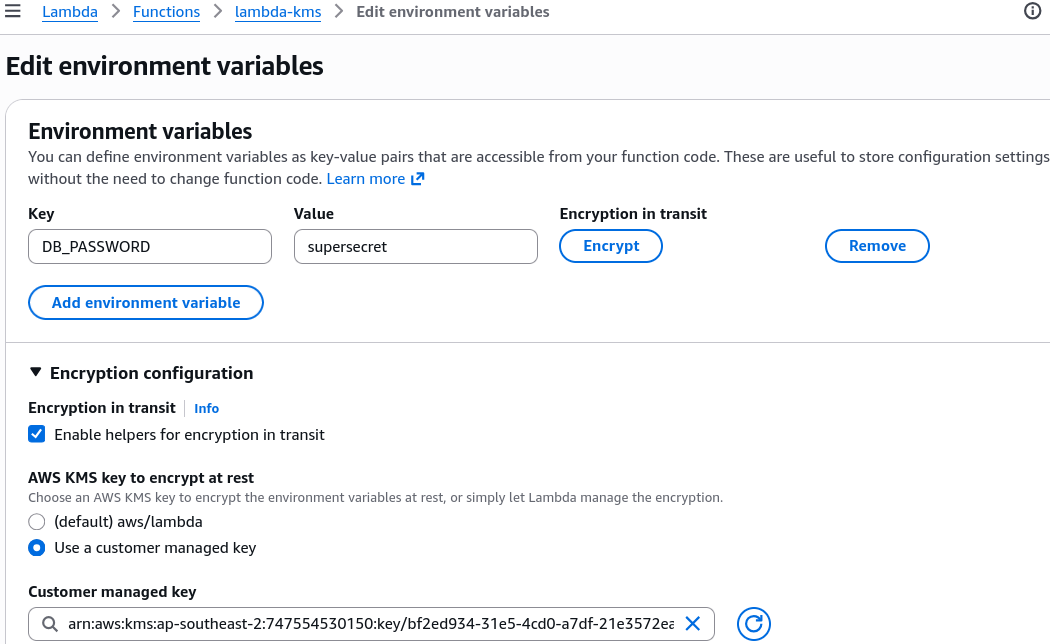
- Encrypt: Hit Encrypt. The console immediately obfuscates the variable into a base64-encoded encrypted cipher blob!
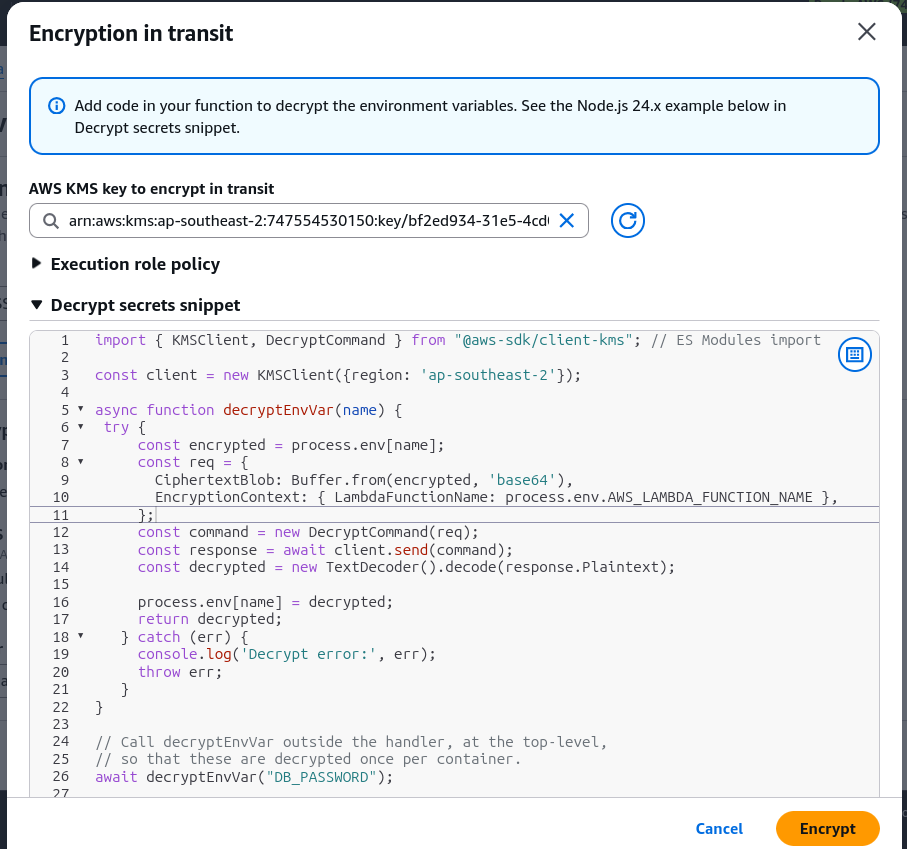
- Copy the Snippet: The AWS Console automatically provides a pre-baked SDK snippet (in Python, Node.js, etc.) that handles decoding the base64 string and firing the
kms:DecryptAPI call.

💻 2. Programmatic Decryption Code Dissection (JavaScript Example)
Because the environment variable stored in the Lambda runtime is now an encrypted cipher blob, your code must explicitly decrypt it at runtime using the AWS SDK and the kms:Decrypt API. Here's a Node.js example:
import { KMSClient, DecryptCommand } from '@aws-sdk/client-kms';

const client = new KMSClient({ region: 'ap-southeast-2' });
const ENCRYPTED_DB_PASSWORD = process.env.DB_PASSWORD;

async function decryptEnvVar(name) {
  try {
    const encrypted = process.env[name];
    const req = {
      CiphertextBlob: Buffer.from(encrypted, 'base64'),
      EncryptionContext: {
        LambdaFunctionName: process.env.AWS_LAMBDA_FUNCTION_NAME,
      },
    };
    const command = new DecryptCommand(req);
    const response = await client.send(command);
    const decrypted = new TextDecoder().decode(response.Plaintext);

    process.env[name] = decrypted;
    return decrypted;
  } catch (err) {
    console.log('Decrypt error:', err);
    throw err;
  }
}

await decryptEnvVar('DB_PASSWORD');

export const handler = async (event) => {
  console.log('Encrypted Password: ', ENCRYPTED_DB_PASSWORD);
  console.log('Decrypted Password: ', process.env.DB_PASSWORD);
  return 'Pass';
};
Notice the EncryptionContext parameter in the snippet. When the console encrypts your variable, it automatically binds the LambdaFunctionName as key-value metadata context. Your kms:Decrypt call must pass the exact same encryption context to successfully decrypt the payload!
🛑 3. Troubleshooting the Execution Errors (The Exam Triad)
When setting up this pattern, you will encounter two classic deployment roadblocks:
-
The Access Denied Error (
AccessDeniedException: User... is not authorized to perform: kms:Decrypt) 🛑:- Root Cause: The Lambda function's Execution Role does not have explicit permissions to call the
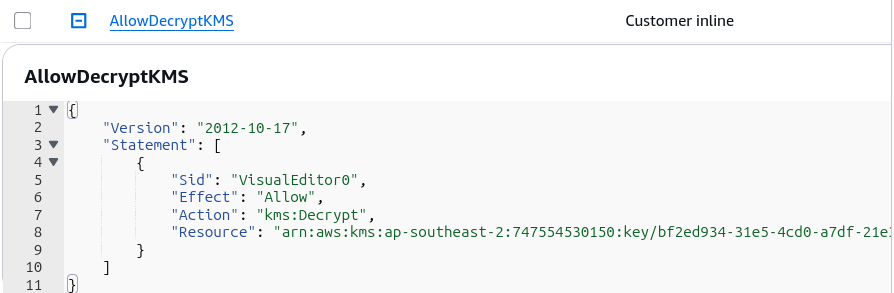
kms:DecryptAPI against the specific Customer Managed Key ARN. - The Fix: Edit the Lambda IAM Execution Role and attach an inline or managed policy granting
kms:Decryptpermissions targeting the specific KMS Key ARN:
- Root Cause: The Lambda function's Execution Role does not have explicit permissions to call the
-
The Function Timeout Error (
Task timed out after 3.00 seconds) ⏳:- Root Cause: The default 3-second timeout limit for a new Lambda function is often too short when cold-starting the Python runtime and initiating an outbound HTTPS SDK call to the KMS endpoint.
- The Fix: Increase the Lambda function timeout under Configuration ──► General configuration (e.g., set to 10 seconds).
Exam Tips
- KMS Helper Encryption Context: If an exam scenario asks why a Lambda function using console encryption helpers fails to decrypt an environment variable even though the IAM policy allows
kms:Decrypt—check if the code is missing the requiredEncryptionContextparameter containing theLambdaFunctionNamekey. - Lambda execution role vs. KMS Key Policy: Access requires alignment across both sides! The Lambda Execution Role needs
kms:Decryptin IAM, and the KMS Key Policy must allow the role or root account access to use the key. - Secrets Manager / SSM Parameter Store vs. Encrypted Env Vars:
- Encrypting env vars via KMS is great for lightweight, static secrets specific to a single function.
- If secrets require automatic rotation, cross-service sharing, or strict centralized management, AWS Secrets Manager or SSM Parameter Store (SecureString) is the preferred architectural pattern.