KMS Encryption Patterns and Envelope Encryption
We're diving deep into Envelope Encryption and the precise KMS API calls is how you completely secure top marks on Domain 2 of the DVA-C02 exam. 🏎️🔐
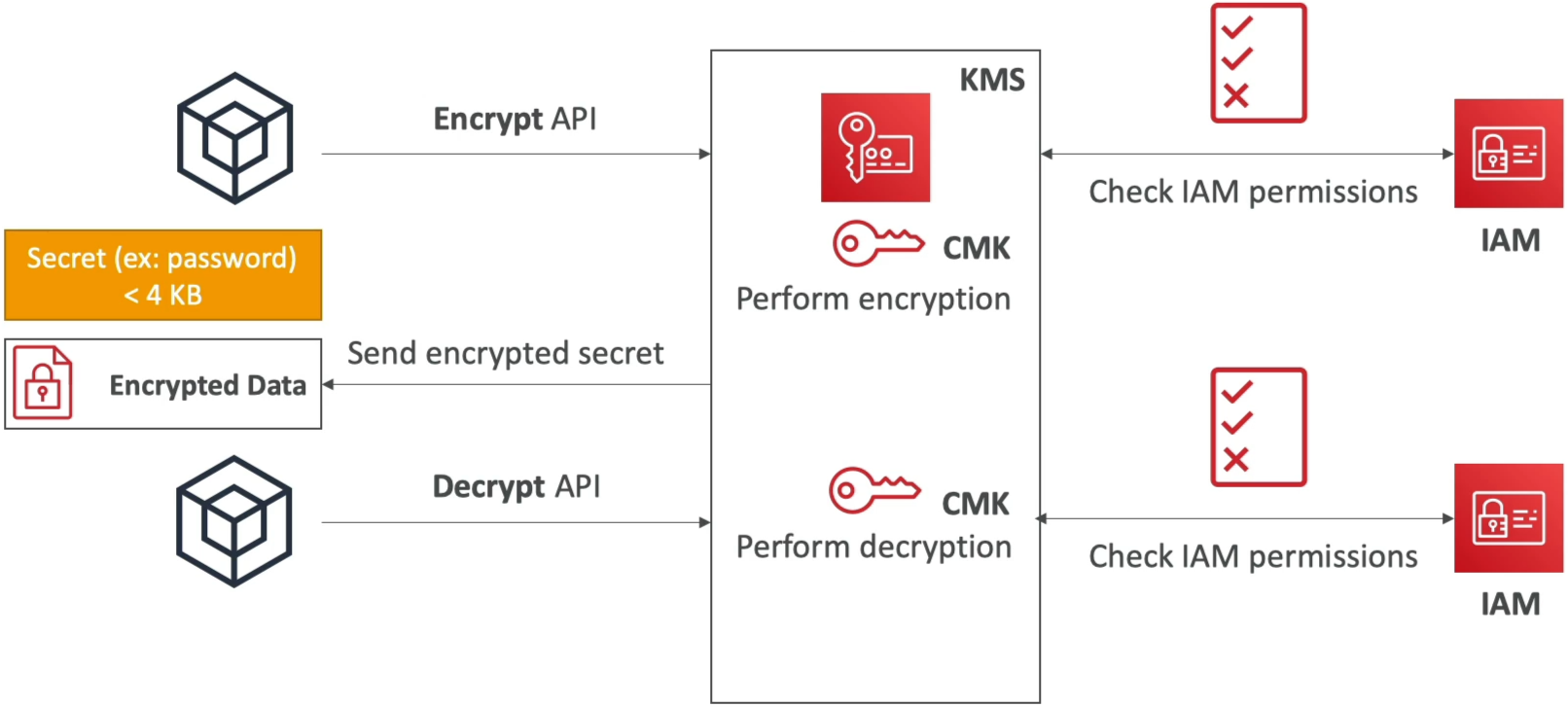
When your payload exceeds that hard 4 KB size limit on direct KMS API calls, passing raw data over the network to KMS is a no-go. Envelope Encryption fixes this by shifting the heavy lifting of payload encryption locally to your application's CPU using a local Data Key, while letting KMS do what it does best: securely generating and managing cryptographic keys.
Key Takeaways
Let's check the two execution patterns, the API matrix, and the key caching strategies for your DVA-C02 exam prep:
📐 Direct KMS APIs vs. Envelope Encryption Pattern
                               ┌────────────────────────────────────────────────────────┐
                               │                 AWS KMS PAYLOAD LIMIT                  │
                               └───────────────────────────┬────────────────────────────┘
                                                           │
             ┌─────────────────────────────────────────────┴─────────────────────────────────────────────┐
             ▼                                                                                           ▼
📉 Direct API Calls (≤ 4 KB)                                                                📈 Envelope Encryption (> 4 KB)
  • Payload sent straight to KMS endpoints                                                     • Application calls `GenerateDataKey`
  • Single API roundtrip (`kms:Encrypt` / `kms:Decrypt`)                                       • Returns Plaintext DEK + Encrypted DEK
  • Hard size cap: Exactly 4,096 bytes                                                         • App encrypts data locally via CPU using Plaintext DEK
  • Best for: Short strings, API tokens, DB passwords                                          • Plaintext DEK wiped from RAM immediately
                                                                                               • Stores Encrypted DEK alongside encrypted file
Direct KMS API Calls (≤ 4 KB)
🛠️ Step-by-Step Envelope Encryption Lifecycle
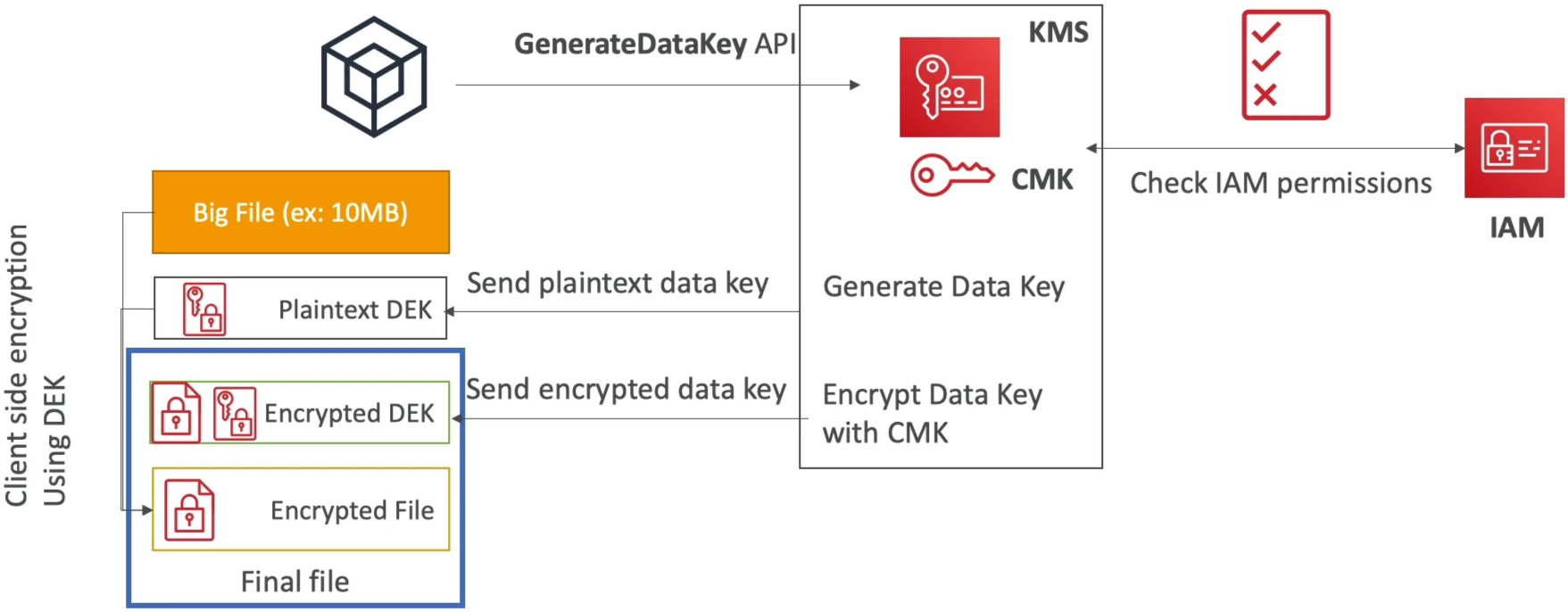
📤 Phase 1: Encryption Flow
- The Request: Your application calls
GenerateDataKeypassing a Customer Managed Key (CMK) ARN. - The Handshake: KMS checks IAM permissions (
kms:GenerateDataKey), generates a unique Symmetric Data Encryption Key (DEK) in memory, and returns TWO items:- Plaintext DEK: Used immediately in your app's memory to encrypt the large file locally via AES-256.
- Encrypted DEK: Already encrypted by KMS using your CMK.
- The Local Execution: Your application encrypts the large file locally using the Plaintext DEK.
- The Cleanup & Envelope Wrap: Your application wipes the Plaintext DEK from RAM immediately! It then packages the local ciphertext alongside the Encrypted DEK into a single envelope structure.
📥 Phase 2: Decryption Flow
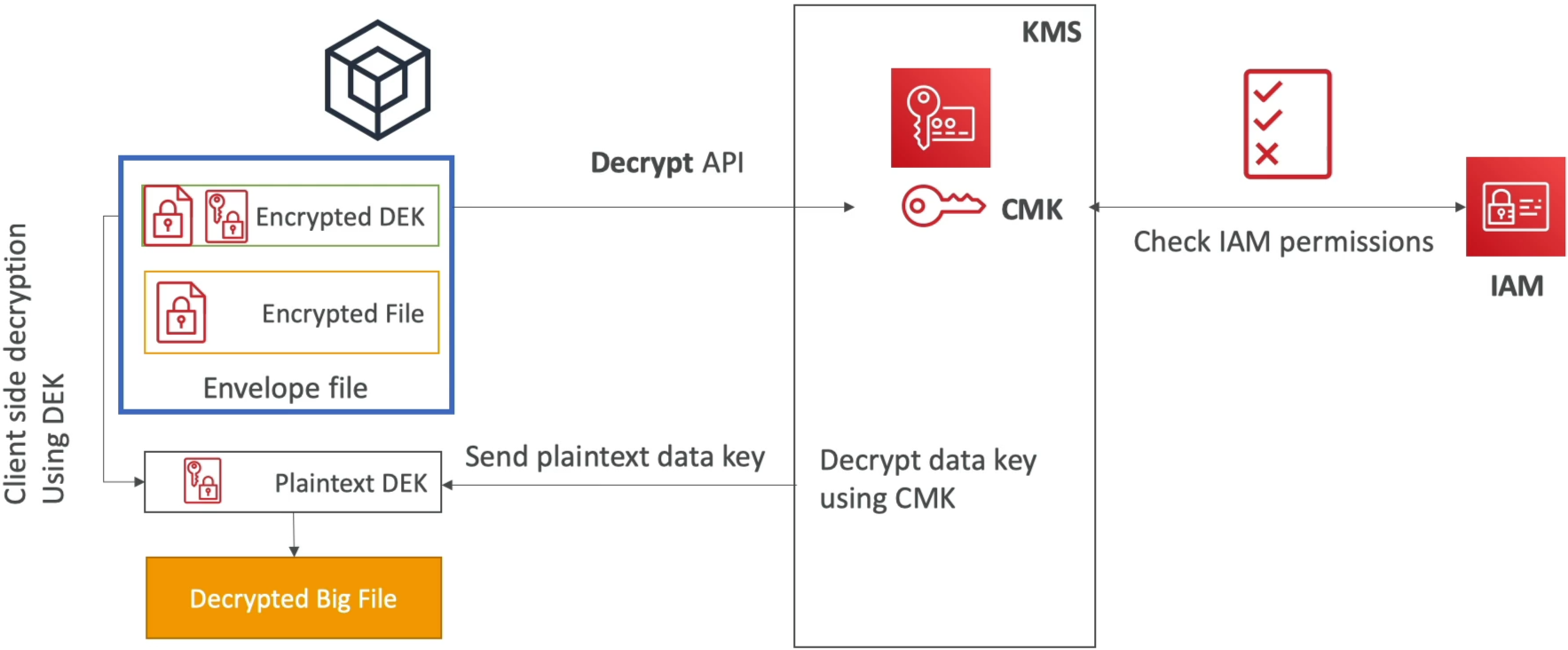
- The Retrieval: Your app reads the envelope file, extracting the Encrypted DEK and the local ciphertext/encrypted file.
- The KMS Callback: Your app calls the
kms:DecryptAPI passing ONLY the Encrypted DEK (which is well under 4 KB). - The Unwrapping: KMS uses your CMK inside its Hardware Security Module (HSM) to decrypt the DEK and returns the Plaintext DEK back to your application.
- Local Payload Decryption: Your app decrypts the large file locally using the returned Plaintext DEK, then discards the Plaintext DEK from RAM.
⚡ Optimizing with AWS Encryption SDK & Data Key Caching
Writing custom code for Envelope Encryption can be tedious. The AWS Encryption SDK abstracts the pattern completely, adding a performance booster called Data Key Caching.
🚀 DATA KEY CACHING MECHANICS:
   App Request ──► [ LocalCryptoMaterialsCache ] ──(Cache Hit?)──► Reuse Cached DEK (No KMS Call!)
                          │
                   (Cache Miss?)
                          │
                          ▼
             Call KMS: GenerateDataKey ──► Save DEK to Local Cache
- Why use it? Massively reduces KMS API costs ($0.03 per 10k requests) and slashes latency by reusing DEKs across multiple local encryption calls.
- The Security Tradeoff: Reusing key material across multiple files lowers key isolation.
- Configuring
LocalCryptoMaterialsCache: Managed by setting strict thresholds viaCachingCryptoMaterialsManager:max_age: Maximum time (seconds) a DEK stays in cache.max_bytes_encrypted: Max total volume of data a single DEK can encrypt.max_messages_encrypted: Max number of individual files/payloads encrypted by one DEK.
📑 The KMS Symmetric API Cheat Sheet
| API Action | What it returns? | Primary Use Case | DVA-C02 Exam Trap |
|---|---|---|---|
Encrypt | Ciphertext | Encrypt payloads ≤ 4 KB directly inside KMS. | Fails if payload > 4 KB! |
GenerateDataKey | Plaintext DEK + Encrypted DEK | Real-time Envelope Encryption (> 4 KB). | Correct API for immediate local encryption. |
GenerateDataKeyWithoutPlaintext | Encrypted DEK ONLY | Generating DEKs to store for future/deferred use. | WRONG API for immediate encryption (requires calling Decrypt first!). |
Decrypt | Plaintext | Decrypts payloads ≤ 4 KB OR decrypts an Encrypted DEK. | Auto-detects CMK from ciphertext headers! |
GenerateRandom | Byte string | Cryptographically secure random number generation. | Used for nonces / seeds. |
Exam Tips
- The 4 KB Size Boundary Trap 🚨: If a scenario details an application needing to encrypt a 5 MB file or a 50 KB JSON payload using KMS—immediately reject
kms:Encrypt! Select the solution utilizingkms:GenerateDataKeyfor Envelope Encryption. GenerateDataKeyvs.GenerateDataKeyWithoutPlaintext: If a question asks which API to call to encrypt a database backup locally right now, chooseGenerateDataKey. If the question specifies generating a key to attach to a storage volume that will be encrypted at a later date, chooseGenerateDataKeyWithoutPlaintext!- Throttling Exception Mitigation (
KMSThrottlingException): If an application encrypting thousands of small files per second starts hitting KMS API rate limits and throwing throttling errors—select the option to implement the AWS Encryption SDK with Data Key Caching (LocalCryptoMaterialsCache) to reduce total API calls to KMS.