S3 Bucket Key
Amazon S3 Bucket Keys are the ultimate cheat code when you're running serverless data lakes or heavy media processing pipelines with SSE-KMS at scale. 🏎️💥
Without an S3 Bucket Key, every single PUT, GET, or HEAD request against an SSE-KMS encrypted bucket forces S3 to make a individual network roundtrip API call to AWS KMS to fetch a fresh Data Encryption Key (DEK). If your application uploads 10 million files a day, that's 10 million direct KMS API calls—which will burn through your operational budget and quickly trigger KMSThrottlingException limit errors!
Key Takeaways
Let's look how S3 Bucket Keys work, the cost-slashing numbers, and the critical exam scenarios.
🏗️ How S3 Bucket Keys Work (Under the Hood)
Instead of calling KMS for every single file operation, S3 requests a temporary bucket-level key directly from KMS via kms:GenerateDataKey. S3 then uses this time-limited bucket key to generate individual object data keys directly in-memory at the S3 storage tier:
❌ WITHOUT S3 BUCKET KEY (Standard SSE-KMS):
   Every S3 Object Upload/Download ──► Direct KMS API Call ──► ($$$ + High KMS Throttling Risk)

✅ WITH S3 BUCKET KEY ENABLED:
   1. S3 requests 1 Bucket-Level Key from KMS ──► (1 KMS API Call)
   2. S3 uses Bucket Key to locally encrypt thousands of objects in memory ──► (0 KMS API Calls)
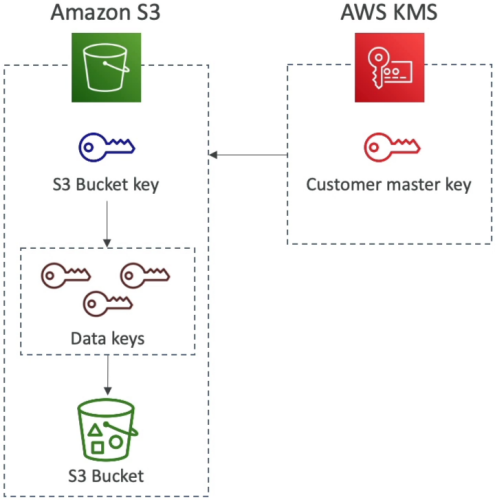
📊 The Operational Impact & Metrics
- 99% Reduction in KMS API Calls 📉: Cuts down KMS requests by up to 99% because KMS is only invoked when the bucket-level key expires or rotates in memory, rather than per object.
- 99% Reduction in KMS Costs 💰: KMS charges \0.03$ per 10,000 API calls. Offloading millions of individual API calls slashes your KMS billing tier down to practically zero.
- Fewer CloudTrail Log Events 📑: Because S3 makes vastly fewer API requests to KMS, your CloudTrail audit logs will show a significantly reduced volume of
kms:GenerateDataKeyandkms:Decryptevents.
🎛️ Console Setup & Configuration
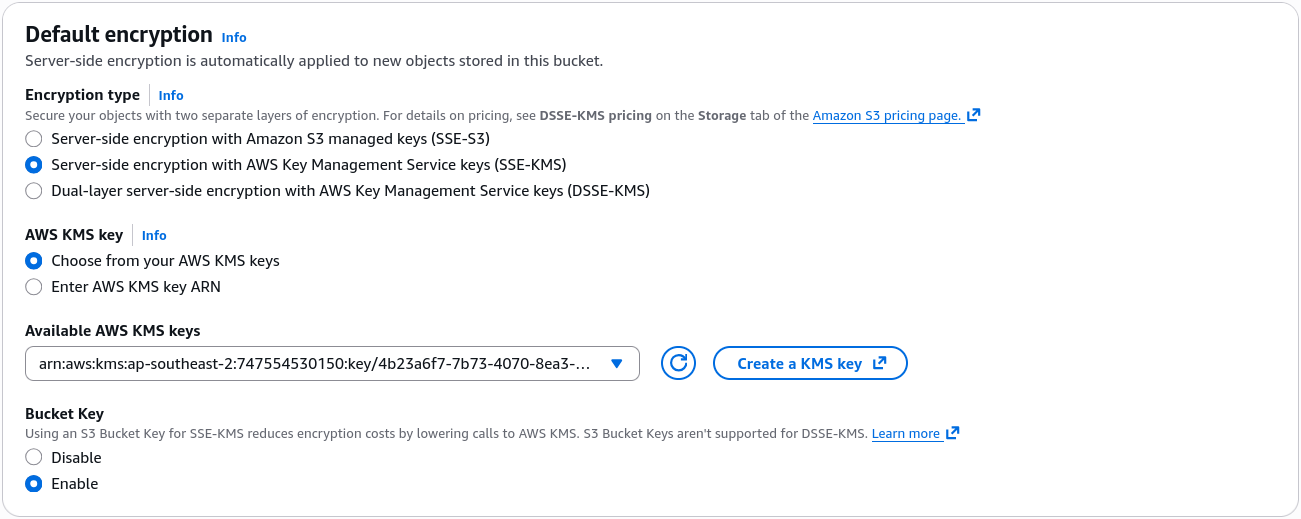
S3 Bucket Keys are enabled by default when creating new S3 buckets with SSE-KMS via the AWS Console!
- Where to find it: S3 Console ──► Select Bucket ──► Properties tab ──► Default encryption ──► Choose SSE-KMS ──► Toggle Bucket Key to Enable.
- Key Choice: Works seamlessly whether you are using an AWS Managed Key (
aws/s3) or a Customer Managed Key (CMK).
Exam Tips
- The High-Volume S3 KMS Throttling Question 🚨: If an exam scenario describes an application uploading millions of small files to an S3 bucket encrypted with SSE-KMS that fails under high traffic due to
KMSThrottlingExceptionerrors or extreme KMS API costs—look straight for the answer that enables S3 Bucket Keys on the S3 bucket! - CloudTrail Event Audit Reduction: If a question asks why CloudTrail is suddenly logging far fewer KMS decryption events after a security optimization was applied to an S3 data lake—the root cause is the introduction of S3 Bucket Keys caching keys at the S3 tier.