SSM Parameter Store Overview
AWS Systems Manager (SSM) Parameter Store is the undisputed heavy-hitter for serverless configuration management and lightweight secret storage. 🏎️⚡
Whether you're passing database strings into ECS tasks, retrieving golden AMI IDs inside CloudFormation stacks, or serving environment variables to Lambda execution environments, Parameter Store provides a centralized, hierarchical, and audit-ready configuration hub.
Key Takeaways
🏗️ Core Architecture & Data Types
Parameter Store natively supports three distinct parameter types:
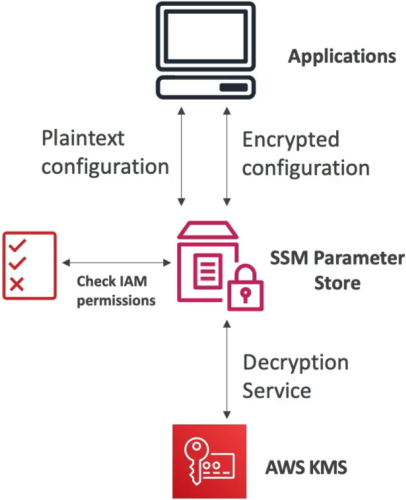
String: Plaintext string values (e.g., API endpoints, log levels, database hostnames).StringList: A comma-separated array of strings (e.g.,subnet-1234,subnet-5678,subnet-9012).SecureString: Sensitive data encrypted at rest using AWS KMS (Customer Managed Keys or the default AWS managed keyaws/ssm).tip💡 KMS IAM Rule: When reading a
SecureStringparameter, the invoking application's IAM execution role needs permissions for BOTHssm:GetParameterANDkms:Decrypt!
🌲 Hierarchical Paths & IAM Scoping
You organize parameters using filesystem-style hierarchical paths (up to 15 levels deep):
📁 /my-department/
   └── 📁 my-app/
        ├── 📁 dev/
        │    ├── 📄 DB_URL
        │    └── 🔒 DB_PASSWORD (SecureString)
        └── 📁 prod/
             ├── 📄 DB_URL
             └── 🔒 DB_PASSWORD (SecureString)
🎯 The IAM Scoping Advantage
Hierarchical naming allows you to write clean, least-privilege IAM policies using wildcard path matching:
{
  "Effect": "Allow",
  "Action": ["ssm:GetParameter", "ssm:GetParametersByPath"],
  "Resource": "arn:aws:ssm:us-east-1:123456789012:parameter/my-department/my-app/dev/*"
}
- The Dev/Prod Boundary: Your
DevLambda function can read anything under/dev/*, but is completely blocked from accessing/prod/*secrets without needing individual IAM policies for every single key!
⚡ Standard vs. Advanced Tier Showdown
AWS splits Parameter Store into two operational tiers:
| Feature Matrix | Standard Tier 🎈 | Advanced Tier ⚡ |
|---|---|---|
| Max Content Size | Up to 4 KB | Up to 8 KB |
| Parameters per Region | Up to 10,000 | Up to 100,000 |
| Parameter Policies? | No | Yes (TTL / Expiration) |
| Cost Model | 100% FREE | $0.05 per parameter / month |
| Tier Conversion | Can upgrade to Advanced anytime | Cannot convert Advanced back to Standard! |
⏳ Advanced Parameter Policies & EventBridge Integration
For Advanced Tier parameters, you can attach automated Parameter Policies to enforce security compliance and rotation schedules:
- Expiration (
Expiration) ⏱️: Sets a Time-to-Live (TTL) timestamp. Once reached, Parameter Store automatically deletes the parameter. - Expiration Notification (
ExpirationNotification) 🔔: Triggers an Amazon EventBridge event days/hours before or after the expiration date so your team or a Lambda function can rotate credentials. - No Change Notification (
NoChangeNotification) 🚨: Triggers an EventBridge event if a secret hasn't been updated within a specified window (e.g., "Alert us ifDB_PASSWORDhasn't changed in 90 days").

Exam Tips
- Public Parameters Integration 🌐: Need to dynamically pull the official latest Amazon Linux 2 or AL2023 AMI ID inside your CloudFormation templates or automated scripts? Query the public parameter path
/aws/service/ami-amazon-linux-latest/amzn2-ami-hvm-x86_64-gp2! - Secrets Manager Reference Trick 🔮: You can reference secrets stored in AWS Secrets Manager directly through Parameter Store by querying the special path
/aws/reference/secretsmanager/secret_name! - Decryption Failure Troubleshooting 🛑: If an application successfully retrieves an SSM parameter but throws a base64 or cipher error on the string value, check if the parameter is a
SecureStringand verify that the application's IAM role includeskms:Decryptfor the target KMS key ARN!