SSM Parameter Store vs Secrets Manager
This head-to-head comparison is one of the most frequently tested scenarios on the entire DVA-C02 exam. 🏎️⚡
Both SSM Parameter Store and AWS Secrets Manager store key-value pairs, integrate with KMS, enforce IAM authorization, and work with CloudFormation. However, choosing the wrong one can lead to unnecessary costs or architectural gaps.
Key Takeaways
⚔️ The Architectural Showdown: Secrets Manager vs. Parameter Store
                               ┌────────────────────────────────────────────────────────┐
                               │                 CONFIGURATION & SECRETS                │
                               └───────────────────────────┬────────────────────────────┘
                                                           │
             ┌─────────────────────────────────────────────┴─────────────────────────────────────────────┐
             ▼                                                                                           ▼
🔐 AWS SECRETS MANAGER                                                                      🗄️ SSM PARAMETER STORE
  • Purpose-built for sensitive, high-value secrets                                           • Broad application configuration & lightweight secrets
  • Forced KMS Encryption (Mandatory)                                                         • Encryption is OPTIONAL (String, StringList, SecureString)
  • Native Automated Secret Rotation (Lambda)                                                 • NO native rotation (Requires EventBridge + Lambda workaround)
  • Native Multi-Region Secret Replication                                                    • Regional boundary (Manual sync required)
  • Max Size: 64 KB                                                                           • Max Size: 4 KB (Standard) / 8 KB (Advanced)
  • Paid: $0.40/secret/month + $0.05 per 10k API calls                                        • Standard Tier: 100% FREE (up to 10k params)
| Feature Matrix | 🔐 AWS Secrets Manager | 🗄️ SSM Parameter Store |
|---|---|---|
| Primary Use Case | DB Passwords, API Keys, OAuth tokens | App configs, feature flags, AMI IDs, secrets |
| KMS Encryption | Mandatory (At rest always encrypted) | Optional (String plain text vs SecureString) |
| Automated Rotation | Native out-of-the-box (Built-in Lambda engine) | None (Requires custom EventBridge + Lambda setup) |
| Multi-Region Replication | Native single-click / API replication | Manual sync or custom deployment scripts |
| Secret Size Ceiling | Up to 64 KB | Up to 4 KB (Standard) or 8 KB (Advanced) |
| Random Password Gen | Built-in CLI/SDK generator (GetRandomPassword) | Not built-in |
| Pricing Model | $0.40/secret/mo + $0.05 per 10k API calls | Standard Tier is FREE ($0.05/mo for Advanced) |
| Cross-Account Access | Easy via Secret Resource Policies | Supported via IAM Role Assumption |
🔄 Secret Rotation Architectures Compared
Pattern A: Native Rotation via Secrets Manager
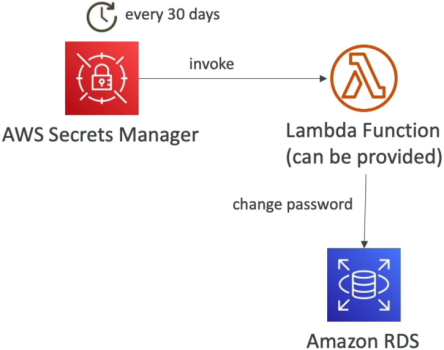
 ⏱️ Schedule Trigger (e.g., Every 30 Days)
            │
            ▼
 🔐 AWS Secrets Manager ──► ⚡ Out-of-the-box Lambda ──► 🎯 Target Service (RDS / Aurora / DocumentDB)
                                   │                        (Updates password inside DB engine)
                                   └───────────────────────────► 🔐 Stores new AWSCURRENT version tag
- How it works: Secrets Manager handles the schedule natively. It invokes a pre-packaged or custom AWS Lambda function that changes the password inside the target database (like Amazon RDS) and updates the secret version tags automatically.
Pattern B: Custom Rotation via SSM Parameter Store
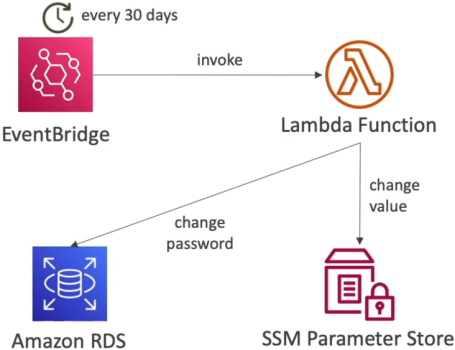
 ⏱️ Scheduled Event (Every 30 Days)
            │
            ▼
 ⏰ Amazon EventBridge Rule ──► ⚡ Custom Lambda Function ──┬──► 🎯 Target Service (RDS Database)
                                                           │     (Changes password inside DB)
                                                           │
                                                           └──► 🗄️ SSM Parameter Store
                                                                 (Updates /my-app/dev/db-password)
- How it works: Parameter Store has zero built-in rotation engines. To rotate a value, you must build an EventBridge Rule on a schedule (e.g., cron) that triggers a custom Lambda function written by you to update both the database and the parameter value.
Exam Tips
- Choose AWS Secrets Manager when:
- You need automatic, scheduled password rotation for RDS, Aurora, DocumentDB, or Redshift out of the box.
- You require multi-region secret replication for cross-region active-active or DR architectures.
- You want to generate random secret passwords during automated stack deployments (e.g., CloudFormation).
- Your secret payload exceeds 8 KB (up to 64 KB).
- Choose SSM Parameter Store when:
- You need to store non-sensitive configuration data (URLs, environment variables, feature flags, AL2023 AMI IDs).
- You are storing a static secret that does not require automatic rotation and want to save on cost using the Standard Tier (Free).
- You want to organize configurations using filesystem-like hierarchical paths (e.g.,
/my-app/dev/db-url).
tip
💡 The SSM Reference Trick: Remember that you can query a secret stored inside Secrets Manager through the SSM Parameter Store API using the path pattern /aws/reference/secretsmanager/your-secret-name!