Amazon OpenSearch Service - Overview
Amazon OpenSearch Service (formerly Amazon ElasticSearch Service) is a total classic when an architectural question demands full-text search, fuzzy/partial string matching, or log analytics dashboard. 🔍
Because standard databases like DynamoDB are optimized for direct primary key / index lookups, offloading search and analytical queries to OpenSearch is an essential design pattern.
Key Takeaways
Let's run through the core features, deployment modes, ingestion pipeline architectures, and DVA-C02 exam tips.
🔎 What is Amazon OpenSearch Service?
OpenSearch is a fully managed search and analytics engine derived from open-source ElasticSearch.
- Key Advantage Over Databases: Unlike DynamoDB (which requires strict Partition/Sort key matching), OpenSearch can search across any field, supporting partial matches, fuzzy search, and auto-complete.
- Query Interface: Uses OpenSearch Query DSL (Domain Specific Language) out of the box, with SQL support enabled via an optional plugin.
- Visualization: Includes OpenSearch Dashboards (formerly Kibana) for interactive log analytics and data visualization.
🏗️ Provisioning Modes
- Managed Clusters: You provision dedicated compute instances (data nodes, master nodes) across Availability Zones.
- OpenSearch Serverless: Automatically handles capacity management, scaling, and provisioning without managing underlying instances.
⚙️ Real-World Architecture & Ingestion Patterns
The DVA-C02 exam frequently tests how to get data into OpenSearch using common serverless pipelines:
                               ┌────────────────────────────────────────────────────────┐
                               │             OPENSEARCH INGESTION ARCHITECTURES         │
                               └───────────────────────────┬────────────────────────────┘
                                                           │
             ┌─────────────────────────────────────────────┼─────────────────────────────────────────────┐
             ▼                                             ▼                                             ▼
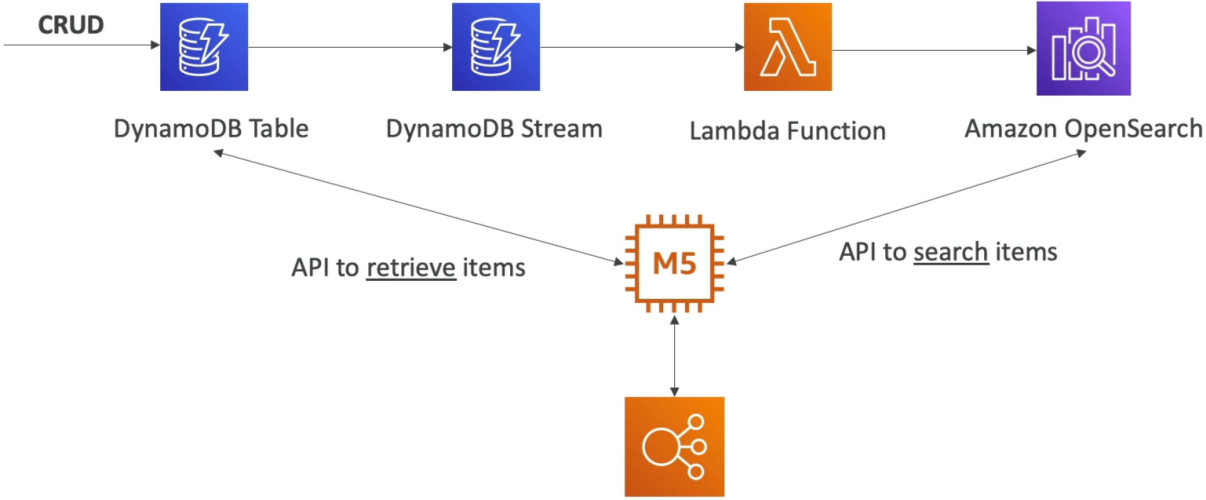
⚡ Pattern A: DynamoDB + Streams                📑 Pattern B: CloudWatch Logs                  🌊 Pattern C: Kinesis Data Streams
  • User updates DynamoDB Table                 • CloudWatch Log Subscription Filter            • Option 1: Firehose (Near Real-time)
  • DynamoDB Stream triggers Lambda             • Routes to Lambda or Kinesis Firehose          • Option 2: Lambda Reader (Real-time)
  • Lambda writes record to OpenSearch          • Writes log payload into OpenSearch             • Direct API write to OpenSearch
🔹 Pattern A: DynamoDB Offloading for Full-Text Search
- App writes item to DynamoDB Table.
- DynamoDB Streams captures the insert/update/delete mutation.
- AWS Lambda polls the stream and syncs the payload into OpenSearch in real time.
- App searches OpenSearch for partial text (e.g.,
"straw hat") to fetch item IDs, then performs a high-speedGetItemcall on DynamoDB!
🔹 Pattern B: CloudWatch Logs Analytics
- Subscription Filter ──► Lambda ──► OpenSearch: Real-time log streaming via managed Lambda execution.

- Subscription Filter ──► Kinesis Data Firehose ──► OpenSearch: Near real-time, high-volume buffered log ingestion without writing custom Lambda code!

🔹 Pattern C: Kinesis Data Streams
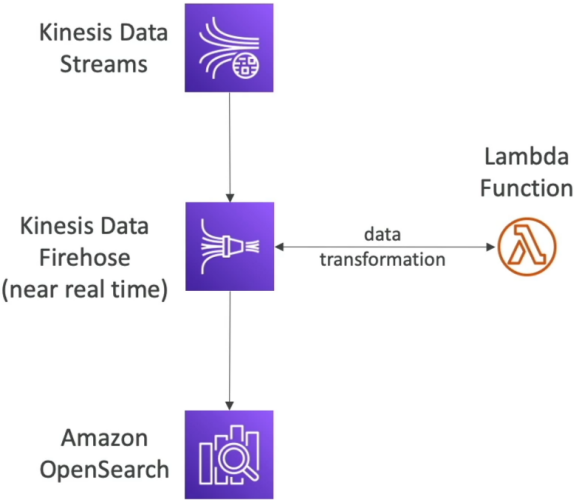
- Kinesis Data Streams ──► Kinesis Data Firehose ──► OpenSearch: Near real-time ingestion with built-in buffering and automatic scaling.
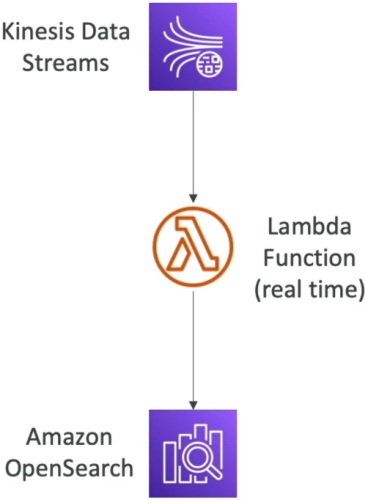
- Option 2: Kinesis Data Streams ──► Lambda ──► OpenSearch: Real-time ingestion with custom transformation logic in Lambda.
Exam Tips
- The DynamoDB Partial Search Trap 🚨: If a scenario describes a DynamoDB table storing product catalogs or user profiles where users now need to perform fuzzy searching or partial name matching across unindexed fields—select streaming DynamoDB updates via DynamoDB Streams + Lambda into Amazon OpenSearch Service.
- Near Real-time vs. Real-time Ingestion:
- If the pipeline requires zero code / built-in buffering for high throughput: Kinesis Data Firehose ──► OpenSearch.
- If the pipeline requires sub-second custom transformations: Kinesis Data Streams / DynamoDB Streams ──► Lambda ──► OpenSearch.