IAM Policies
This lecture focuses on IAM policies in AWS.
Key Takeaways
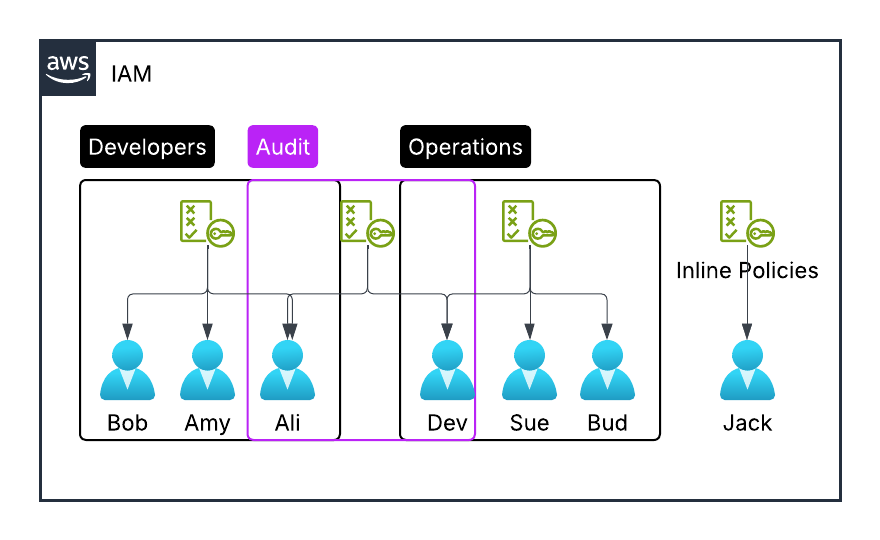
- Group Level Policies: IAM policies can be applied to user groups, allowing members to share the same permissions.
- Inline Policies: These policies are specific to individual users regardless of their group memberships.
- Multiple Group Membership: Users can belong to more than one group and inherit multiple policies, leading to layered approach in policy assignment.
IAM Policy Structure
{
  "Version": "2012-10-17",
  "Id": "S3-Account-Permissions",
  "Statement": [
    {
      "Sid": "1",
      "Effect": "Allow",
      "Principal": {
        "AWS": "arn:aws:iam::123456789012:root"
      },
      "Action": ["s3:GetObject", "s3:PutObject"],
      "Resource": "arn:aws:s3:::mybucket/*"
    }
  ]
}
- IAM Policy Structure: Key components of a policy include:
- Version Number: Specifies the policy language version.
- ID: A unique identifier for the policy.
- Statement: Each has:
- Sid (Statement ID): A unique statement identifier (optional).
- Effect: Defines whether the action is allowed or denied.
- Principal: Identifies the user or role the policy applies to.
- Action: Specifies the allowed or denied API calls.
- Resource: Details the specific resources affected.
- Conditions: Optional constrains to apply.
- Importance of Understanding Components: Familiarity with components like effect, principal, action, and resource is crucial for effective IAM management in AWS.