EC2 Instance Roles Demo
One thing to remember from this section is Never, ever bake hardcoded API keys into an EC2 instance. The absolute gold standard is to use IAM Roles.
Key takeaways
- The Right Way Vs. The Wrong Way:
- The Wrong Way: Running
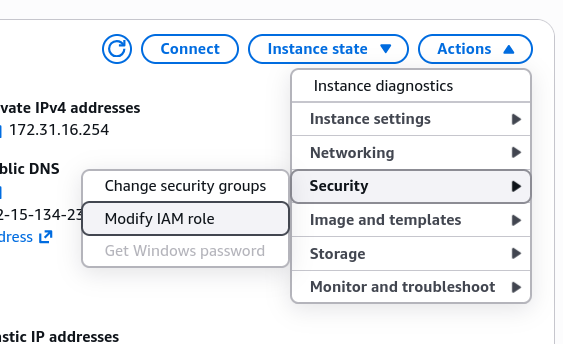
aws configureand pasting your personalAccess Key IDandSecret Access Keydirectly onto the instance is a massive security hazard. If someone else logs into that server, they can easily steal your credentials. - The Right Way: You create an IAM Role, with the specific permissions needed, then attach that role directly to the EC2 instance via the AWS Console. (Actions > Security > Modify IAM Role).
- The Wrong Way: Running
- How the Instance Retrieve Credentials:
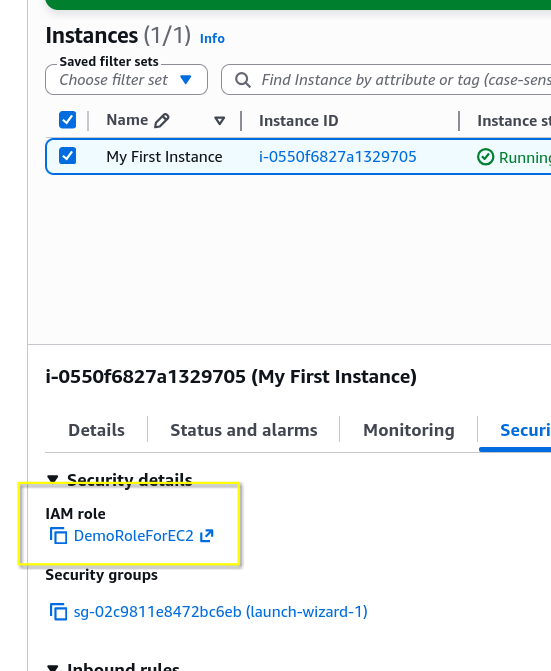
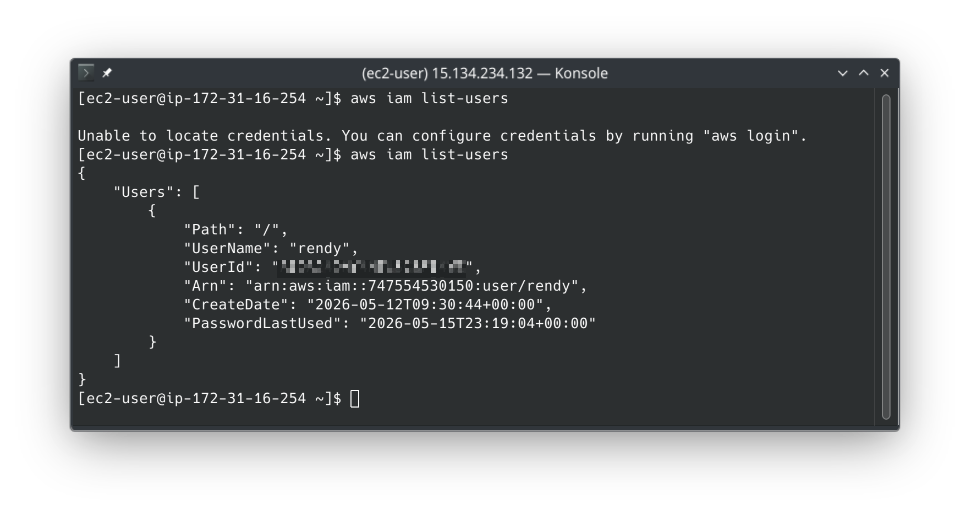
- Zero configuration: You notice that you didn't need to restart the machine or SSH session. The AWS CLI automatically knows to look at the Instance Metadata Service to grab temporary security credentials provided by that role.
- Zero configuration: You notice that you didn't need to restart the machine or SSH session. The AWS CLI automatically knows to look at the Instance Metadata Service to grab temporary security credentials provided by that role.
- Permissions are Dynamic:
- Real-time Changes: Permissions are linked directly to the role, not hard-coded into the machine. When you add/remove permissions from the role, the instance immediately gets those changes without needing a reboot or reconfiguration.
- Real-time Changes: Permissions are linked directly to the role, not hard-coded into the machine. When you add/remove permissions from the role, the instance immediately gets those changes without needing a reboot or reconfiguration.