EC2 Instance Purchasing Options
The "Purchasing Options" looks a bit confusing at first, but at its core, it's just different ways to get discounts on EC2 instances and pick the right option based on the workloads.
Key takeaways
- The On-Demand Baseline:
- The Vibe: Pay for what you use by the second (after the first minute for Linux/Windows).
- Pros/Cons: Highest cost, but absolute freedom, no upfront payments, no long-term commitments.
- Best For: Short-term, unpredictable workloads that cannot be interrupted.
- Committed to Long Workloads (1/3 years): If your app is running 24/7 (like a production database), going On-Demand is a massive waste of cash. Instead, use these:
- Reserved Instances (RI): You commit to a specific instance config (OS, region, type) for up to 72% off.
- Convertible RI: Gives you up to 66% off but lets you swap instance families or OS types over time if your tech stack changes.
- Saving Plans: The modern way. Instead of committing to specific hardware specs, you commit to a dollar amount per hour (e.g., $10/hour). It's way more flexible across different instance sizes, OS, and sizes while giving the same 72% discount.
- Reserved Instances (RI): You commit to a specific instance config (OS, region, type) for up to 72% off.
- The "High Risk, High Reward" Move:
- Spot Instances: Think of these as AWS clearing out its "empty hotel rooms" for dirt cheap. You can get up to 90% off.
- The Catch: AWS can reclaim (terminate) your instance at any time with only a 2-minute warning if someone else bids higher or they need the capacity back.
- Best For: Fault-tolerant, batch-processing jobs, data analysis, or image rendering. Never put a critical app or database on Spot instances.
- Physical Isolation: Compliance & Licensing
- Dedicated Instances: You run on hardware that is physically separated from other AWS customers, but you don't control the exact placement of your VMs.
- Dedicated Hosts: You rent the entire physical server box. You have an absolute control over hardware configuration and instance placement.
- Use case: The only reason to use this is if you have strict compliance requirements or need to bring your own licenses (BYOL) for software that doesn't allow multi-tenant environments.
- Capacity Reservations: No discount
- You pay full on-demand price to "lock down" a room in a specific AZ so you are guaranteed to have it when you launch your app.
- The Catch: You are billed for it whether you are running an instance or not. It doesn't save you money; it just guarantees you won't hit an "out of capacity" error during peak events.
Quick Cheat Sheet for Exam
| If the scenario says... | Your answer should be... |
|---|---|
| "Predictable, steady-state app running long-term" | Reserved Instances or Savings Plans |
| "Batch processing / stateless / cheap as possible" | Spot Instances |
| "Bring Your Own License (BYOL) / Per-core billing" | Dedicated Hosts |
| "Testing a new app / short-term / unpredictable traffic" | On-Demand |
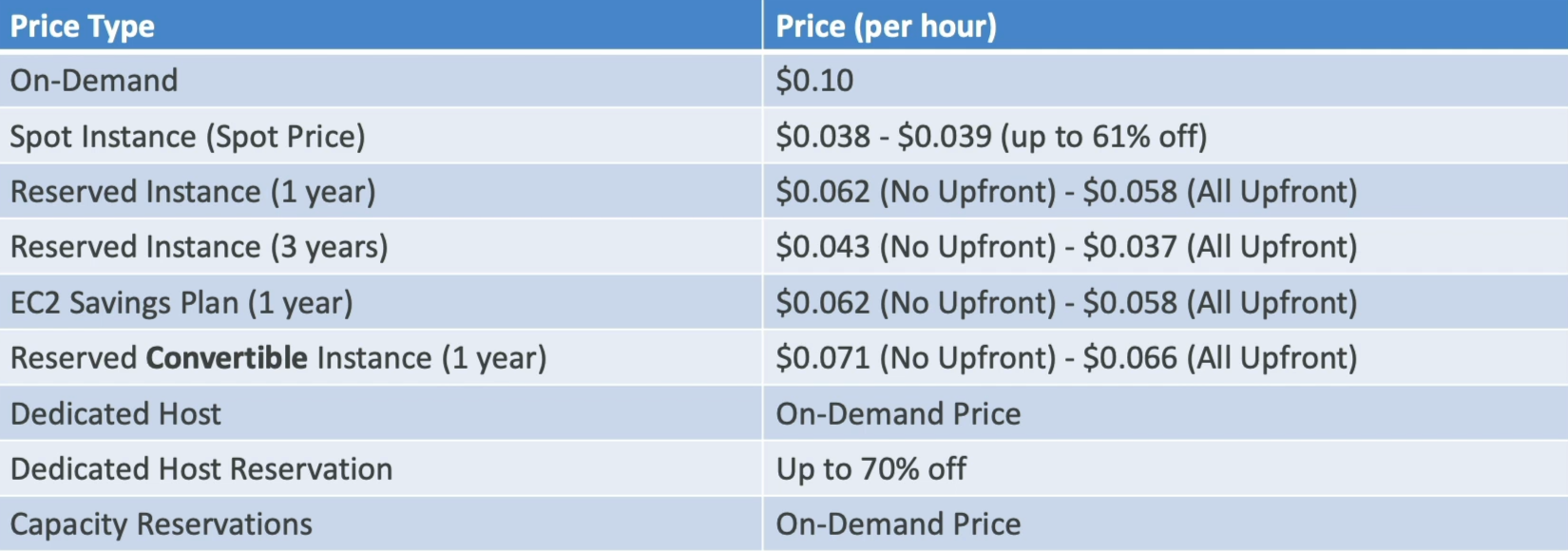
Price Comparison Example
Price comparison example for m4.large in us-east-1 (N. Virginia):