EBS Multi-Attach
EBS Multi-Attach is a feature that allows a single EBS volume to be attached to multiple EC2 instances simultaneously.
Key Takeaways
The Core Mechanic
- Breaking the Rule: Normally, an EBS volume is strictly tied 1:1 to a single EC2 instance. Multi-Attach completely shatters this constraint by letting you hook up the exact same EBS volume to multiple EC2 instances at the same time.
- Full Permissions: Every single attached instance get concurrent, full Read and Write access to raw volume block simultaneously.
Strict Limitations (The Filter Criteria)
To use multi-attach, your architecture must check some incredibly strict boxes:
- The Family Constraint: It is exclusively available for the provisioned IOPS families (
io1andio2). You cannot use it withgp2,gp3or HDD volumes. - AZ Locked: Even with multi-attached turned on, the volume is still completely bound to a single AZ. All instances sharing the drive must reside in the exact same AZ.
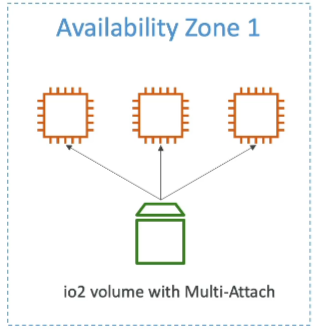
- The Magic Number (16): You can concurrently attach the shared volume to a maximum of *16 EC2 instances at any one time.
- Hardware Requirement: Under the hood, this only works on AWS Nitro System-based EC2 instances, which means you need to be using a Nitro-based instance type (e.g.,
c5,m5,r5, etc.) to take advantage of this feature.
The Developer Responsibility:Cluster-Aware Filesystems
- Data Corruption Trap: Standard file systems (like Linux
ext4orXFS) have no idea that other computers are writing to the exact same disk blocks. If two instances try to write to the same sector simultaneously using standard file systems, your data will get instantly corrupted. - The Fix: You must deploy a cluster-aware file system (Like
GFS2orOCFS2on Linux) or let a cluster volume manager handle concurrent write operations at the application layer.
Ideal Use Cases
- Clustered Linux Applications (e.g., Teradata setups)
- Active-active or active-standby application architectures require rapid, zero-delay storage failover.
- Applications explicitly engineered to handle concurrent write operations at the software layer.
Exam Tips
-
If the question says "Clustered Linux Application", "Concurrent raw block storage writes" or "lowest block-level latency" look for EBS Multi-Attach (
io1/io2). -
If the question says Standard shared file network access, file system hierarchy (POSIX) or sharing across multiple AZs, pick Amazon Elastic File System (EFS) instead, we will talk about EFS in the next section, however something to memorize is that Multi-Attach cannot cross AZs; EFS can!
-
The Boot Volume Rule: You cannot use a Multi-Attach enabled volume as an OS boot/root volume. It can only be attached as a secondary data volume.