EBS Overview
Stephane's analogy that it's like a "network USB stick", is perfect to make us understand the concept of EBS. There is one major detail that Stephan mention that it can only "be mounted one instance at a time" is a constraint for the CCP level exam, for a Developer, there's an exception to this rule.
Key Takeaways
- The Core Mechanics:
- What is is: Elastic Block Store (EBS) is a network drive (not a physical drive directly inside the host). Because it talks over the network, it can introduce a tiny bit of latency compared to hardware-attached storage.
- The Blueprint: It allows you to persist data. If your EC2 instance crashes or gets terminated, the data on your EBS volume stays safe and can be remounted onto brand-new instance.
- AZ Locked: EBS volumes are strictly bound to a single Availability Zone (AZ). An EBS volume created in
ap-southeast-2a(Sydney AZ 1) cannot be directly attached to an EC2 instance sitting inap-southeast-2b(Sydney AZ 2). To move it, you have to take a Snapshot first.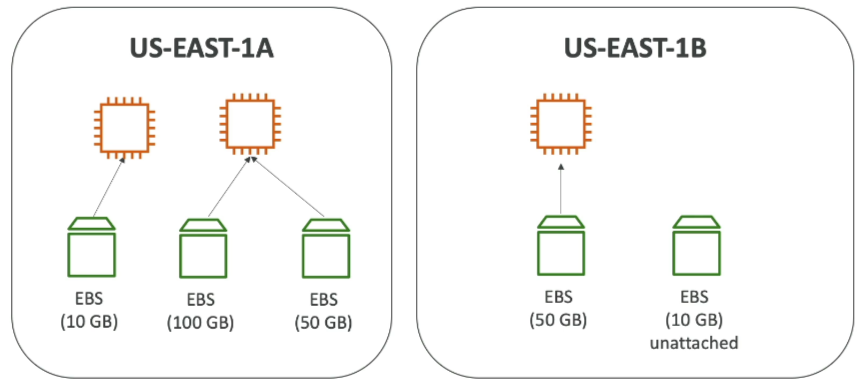
- DVA-C02 Level Exception:
- While standard EBS volumes hook up 1:1 with an instance, AWS has a developer feature called EBS Multi-Attach.
- This lets you attach a single EBS volume to multiple EC2 instances at the same time, we will cover this in the upcoming section.
- Provisioning & Billing
- You must define your capacity (Gigabytes) and your IOPS (Input/Output Operations per Second) ahead of time.
- The Catch: You are billed for what you provision, not what you actually use. If you allocate a 100GB volume and only write 2GB of code to it, you're still paying for all 100GB. You can dynamically increase the size later if your app grows.
- Delete on Termination Attribute: This is a classic exam "gotcha".
- Root Volume: The primary drive containing the OS. By default, Delete on Termination is ENABLED. When you terminate the EC2 instance, the root drive gets wiped instantly.
- Extra Volumes: Any secondary data drives you attach later. By default, Delete on Termination is DISABLED. If you kill the instance, these volume persist in your account (and keep racking up charges until you delete them manually).
- You can override these defaults in the Console/CLI at launch time to preserve logs or database files on the root volume when an instance is torn down.
Practice Test
Question 1: A Company uses a large set of EBS volumes for their fleet of Amazon EC2 instances. As an AWS Certified Developer Associate, your help has been requested to understand the security features of the EBS volumes. The company does not want to build or maintain their own encryption key management infrastructure.
Can you help them understand what works for Amazon EBS encryption? (Select two)
- You can encrypt an existing unencrypted volume or snapshot by using AWS Key Management Service (KMS) AWS SDKs
- Encryption by default is a Region-specific setting. If you enable it for a Region, you cannot disable it for individual volumes or snapshots in that Region
- A volume restored from an encrypted snapshot, or a copy of an encrypted snapshot is always encrypted
- A snapshot of an encrypted volume can be encrypted or unencrypted
- Encryption by default is an AZ specific setting. If you enable it for an AZ, you cannot disable it for individual volumes or snapshots in that AZ
Correct Answers
- You can encrypt an existing unencrypted volume or snapshot by using AWS Key Management Service (KMS) AWS SDKs
- Explanation: This is an incorrect statement. There is no direct way to encrypt an existing unencrypted volume or snapshot. You can encrypt an unencrypted snapshot by copying and enabling encryption while copying the snapshot. To encrypt an EBS volume, you need to create a snapshot and then encrypt the snapshot as described earlier. From this new encrypted snapshot, you can then create an encrypted volume.
- Encryption by default is a Region-specific setting. If you enable it for a Region, you cannot disable it for individual volumes or snapshots in that Region
- Explanation: You can configure your AWS account to enforce the encryption of the new EBS volumes and snapshot copies that you create. Encryption by default is a Region-specific setting. If you enable it for a Region, you cannot disable it for individual volumes or snapshots in that Region.
- A volume restored from an encrypted snapshot, or a copy of an encrypted snapshot is always encrypted
- Explanation: By default, the CMK that you selected when creating a volume encrypts the snapshots that you make from the volume and the volumes that you restore from those encrypted snapshots. You cannot remove encryption from an encrypted volume or snapshot, which means that a volume restored from an encrypted snapshot, or a copy of an encrypted snapshot is always encrypted.
- A snapshot of an encrypted volume can be encrypted or unencrypted
- Explanation: This is an incorrect statement. You cannot remove encryption from an encrypted volume or snapshot, which means that a volume restored from an encrypted snapshot, or a copy of an encrypted snapshot is always encrypted.
- Encryption by default is an AZ specific setting. If you enable it for an AZ, you cannot disable it for individual volumes or snapshots in that AZ
- Explanation: This is an incorrect statement. Encryption by default is a Region-specific setting. If you enable it for a Region, you cannot disable it for individual volumes or snapshots in that Region.