EBS Volume Types
A guide to picking the right storage drive based on performance needs and cost considerations.
Key Takeaways
The Boot Volume Constraint
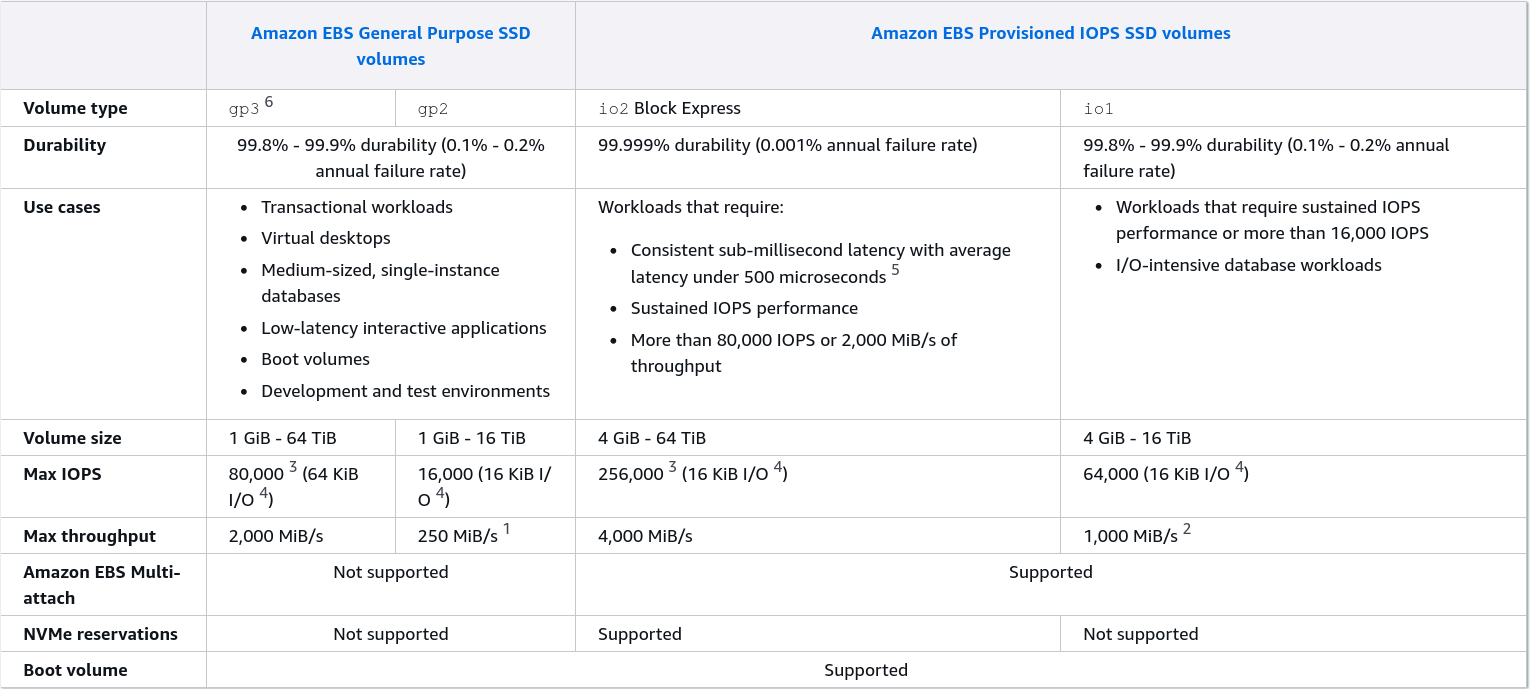
- The Rule: Only SSD-based volumes can be used as root/boot volumes to run the operating system.
- Allowed:
gp2,gp3,io1andio2. - Banned:
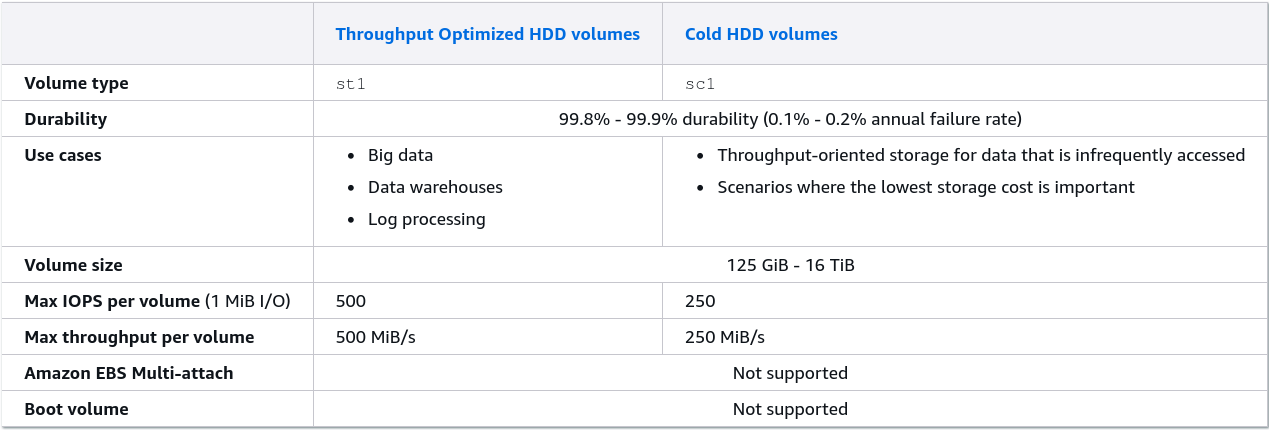
st1(Throughput Optimized) andsc1(Cold HDD) cannot be used to boot an instance under any circumstances.
General Purpose SSDs: gp2 vs. gp3
- gp2 (Older gen): Storage size and performance are linked. If you want more IOPS, you are forced to pay for a bigger volume size (you get 3 IOPS per GB up to a max of 16,000 IOPS, you will maxed out the IOPS at 5,334 GB and above).
- gp3 (Newer gen): Storage size and performance are decoupled. It gives you a baseline of 3,000 IOPS and 125 MB/s throughput out of the box, and you can scale those performance numbers up independently without buying more gigabytes.
- Use Cases: Dev/test environment, virtual desktop, low-latency web server backends.
Provisioned IOPS SSDs: io1 vs io2 Block Express
WHen gp3 isn't fast enough and you need sustained mission-critical performance:
- The Metrics: Use these if you need more than 16,000 IOPS per volume.
io1maxes out at 64,000 IOPS, whileio2 Block Expressgoes wild up to 256,000 IOPS with sub-millisecond latency. - Developer Superpower: Only the
io1andio2families support EBS Multi-Attach (allowing the raw network rive to be hooked up to multiple Nitro instances at once). - Maximum Provisioned IOPS Ratio: 50 IOPS per GB for
io1and 1000 IOPS per GB forio2 Block Express. - Use Cases: Critical business applications, heavy write relational databases (like large PostgreSQL or MySQL setups).
Hard Disk Drives (HDDs): st1 vs sc1
These are completely focused on Throughput (MB/s) rather than IOPS (speed of small reads/writes).
- st1 (throughput optimized): Built for processing massive, sequential blocks of data fast.
- Use Cases: Big data, data warehousing, MapReduce, Log processing/aggregation.
- sc1 (cold HDD): The absolute lowest cost block storage option on AWS. Designed for data you don't touch often.
- Use Cases: Infrequently accessed archives, cold storage backup files.
Exam Tips
The Database Clue: If an exam question describes a high-performance database cluster running on EC2 that needs consistent, ultra-low latency and maximum storage performance, skip gp3 and look for provisioned IOPS (io1 or io2).
The Big Data Clue: If the scenario mentions streaming massive log files, running Apache Kafka/Hadoop clusters, or streaming big data processing workloads where cost efficiency for large streams matters most, look for Throughput Optimized HDD (st1).
The Cost Architecture Trap: If a question asks how a developer can increase a volume IOPS without spending money on unneeded storage space, the correct answer is to switch from gp2 to gp3, since gp3 allows independent IOPS configuration.