EBS vs EFS
Let's reiterate the key differences between EBS and EFS
Key Takeaways
Amazon EBS (Elastic Block Store)
- The Blueprint: Acts like a network-attached USB stick. It is built strictly for 1:1 mapping with an EC2 instance.
- The Multi-Attach Exception: The only way to bypass the 1:1 rule is by using
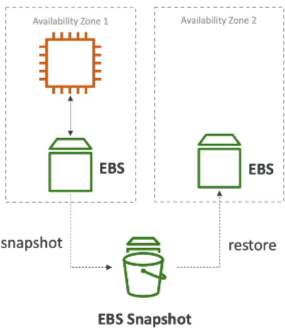
io1andio2volumes, which allow up to 16 Nitro instances to connect concurrently, but it's purely for highly specific clustered workloads. - AZ boundaries: EBS is completely locked to a single AZ. If you want to move that data to another AZ, you must take an EBS Snapshot first and restore it into the new target zone.
- Performance Scaling:
- On
gp2, your IOPS are chained to the disk size (bigger disk = faster drive). - On
gp3andio1/io2, you can scale your IOPS independently without buying more storage space.
- On
- Backup Caution: Taking an EBS backup consumes I/O capacity. Avoid triggering snapshots during peak production traffic hours, or your app's performance could catch a massive lag.
- Lifecycle Default: When an instance is terminated, its root EBS is deleted by default, though you can manually change this behavior.
Amazon EFS (Elastic File System)
- The Blueprint: Acts like a massive, shared cloud network drive (like standard NAS storage).
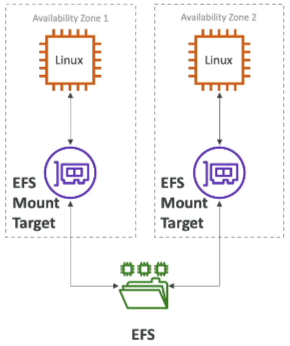
- The Scaling Flex: It is built from the the ground up to be mounted concurrently by hundreds or thousands of EC2 instances across multiple AZs simultaneously.
- OS Restriction: It relies on the POSIX file system and the NDS protocol, meaning it is exclusively compatible with Linux instances.
- Cost Control: It carries a significantly higher price tag than EBS. However, you can neutralize this by using Storage Tiers and Lifecycle Policies to automatically drift old, untouched files into cheaper Infrequent Access (IA) or Archive storage.
EC2 Instance Store (Ephemeral Storage)
- The Blueprint: Physically attached directly to the underlying bare-metal hardware server hosting your virtual machine.
- The Catch: It is entirely ephemeral. If your instance encounter a hardware crash, gets stopped, or gets terminated, the data is instantly wiped out. It only lives as long as the instance stays active or undergoes a basic OS reboot.
Exam Tips
| If the app needs... | Your choice is... |
|---|---|
| "Core OS boot drive, local database storage, standard dev/test environments." | Amazon EBS |
| "Shared content management (WordPress), data sharing across thousands of Linux nodes in multiple AZs.", | Amazon EFS |
| "High-speed caching, temporary buffers, scratch space demanding millions of IOPS with zero care for persistence.", | EC2 Instance Store |