Application Load Balancer (ALB)
This lecture marks the jump from generic traffic routing to intelligent, application-aware microservice management. ALB sits directly in front of modern containerized and serverless app stacks.
Key Takeaways
Layer 7 (Application)
Unlike lower-level network balancers, the ALB inspects the actual HTTP/HTTPS data inside the network packets. Because it can read your application headers and URLs, it can intelligently split traffic behind a single fixed DNS host name using Listener Rules:
- Path-Based Routing: Sending traffic to different target groups based on URL path (e.g.,
res.id.au/api/usersroutes to the user microservice, whileres.id.au/api/productsroutes to the product microservice).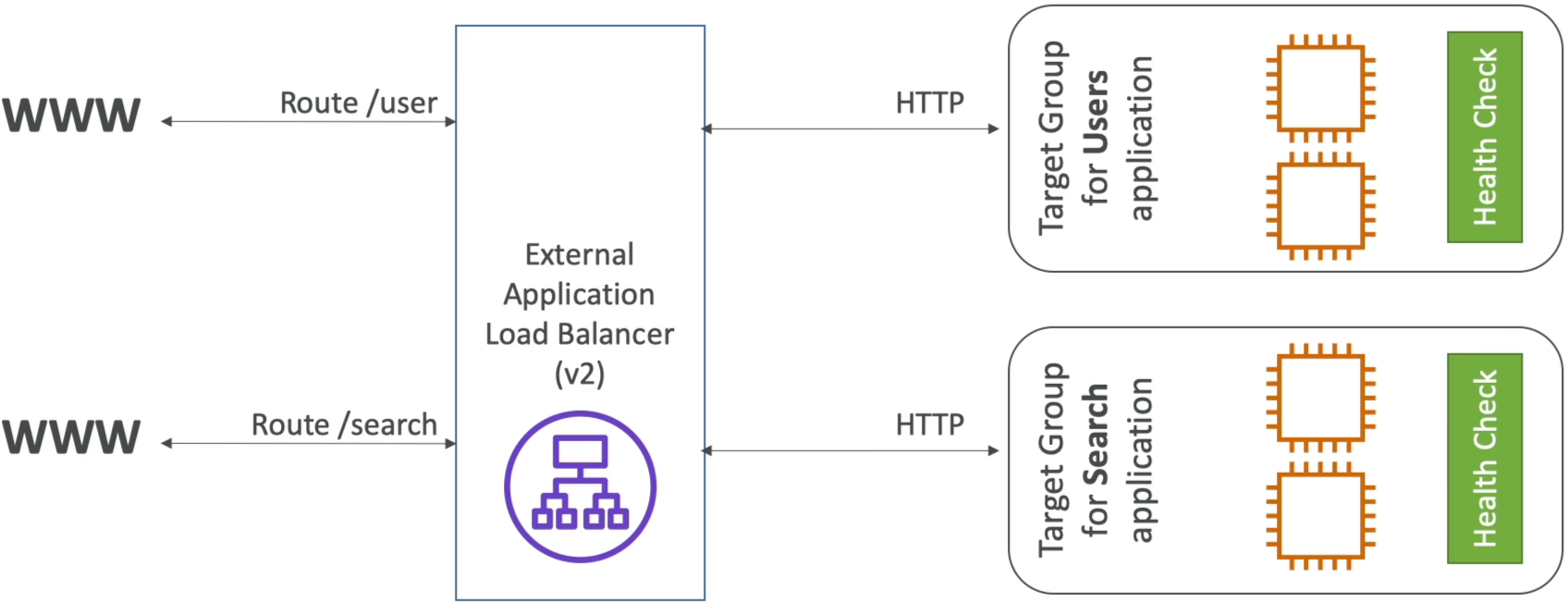
- Host-Based Routing: Routing based on the incoming domain name (e.g.,
one.res.id.auroutes to target Group A, whileother.res.id.auroutes to Target Group B). - Query String & Header Routing: Inspecting parameters right in the URL or request metadata (e.g., routing traffic to separate mobile or desktop target groups based on
?platform=mobileor custom HTTP headers).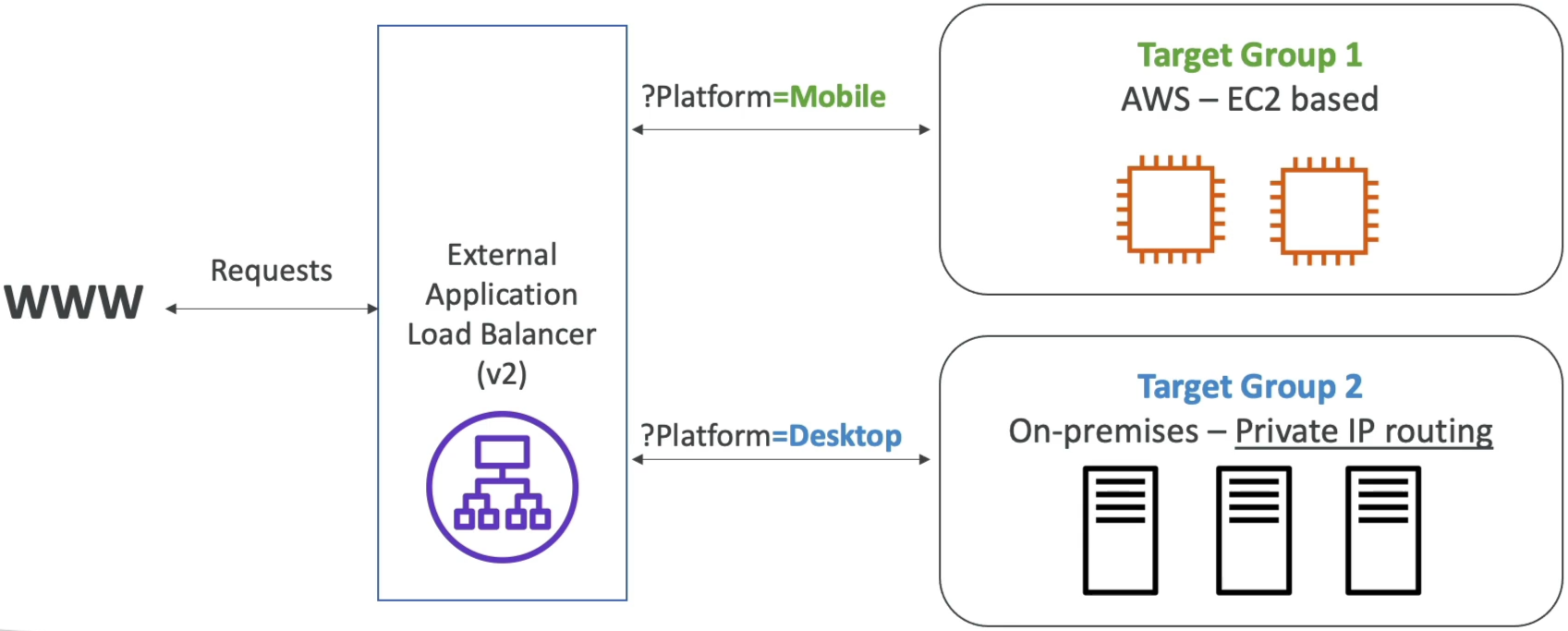
Supported Target Groups
An ALB can forward requests to multiple types of downstream targets grouped into Target Groups:
- EC2 Instances: Standard servers (often managed dynamically by an Auto Scaling Group).
- ECS Tasks: Container instances running docker (ALB leverages port mapping to dynamically find and route traffic to randomly assigned container ports).
- Lambda Function: Allowing HTTP requests to natively trigger serverless, backend code execution.
- Private IP Addresses: Can route traffic to on-premises physical servers, provided they use private IP address routing.
Native Redirection & Protocol Perks
- HTTP to HTTPS Redirects: You can handle SSL/TLS termination directly at the ALB layer and configure a rule to automatically bounce raw port 80 (HTTP) traffic to port 443 (HTTPS) without needing to set up redirection logic on your backend servers.
- Modern Protocols: Standard OOTB support for highly efficient HTTP/2 and persistent, two-way connection streaming over WebSockets.
Connection Termination & The Forwarded Headers
Because the ALB intercepts and terminates the incoming client connection, a major proxy masking effect occurs:
- The Masking Effect: The backend EC2 instances only see the private IP address of the load balancer as the source of incoming traffic.
- The Solution: To help your application code read the real client data for logging or security tracking, the ALB automatically injects three critical headers into the forwarded request:
X-Forwarded-For: Contains the true public IP address of the originating client.X-Forwarded-Proto: The protocol the client used to connect (e.g.,HTTPorHTTPS).X-Forwarded-Port: The port the client used to connect (e.g.,80or443).
Exam Tips
-
The Client IP Tracking Clue: If an exam question describes a scenario where an application behind an ALB needs to block or log bad users based on their geolocation or actual public IP, but the application logs are only showing internal AWS private IPs, the correct developer fix is to modify the application code to read the
X-Forwarded-ForHTTP header instead of socket's default remote IP. -
Health Check Levels: Remember that health checks are always configured and evaluated at the Target Group level, not the overall ALB level. This allows your User target group to have completely different health checking routes (e.g.,
HTTP:80/health) than your Admin target group (e.g.,HTTP:8080/admin-health).
Practice Test
Question 1: Your company uses an Application Load Balancer to route incoming end-user traffic to applications hosted on Amazon EC2 instances. The applications capture incoming request information and store it in the Amazon Relational Database Service (RDS) running on Microsoft SQL Server DB engines.
As part of new compliance rules, you need to capture the client's IP address. How will you achieve this?
- Use the header
X-Forwarded-For - You can get the Client IP addresses from server access logs
- Use the header
X-Forwarded-From - You can get the Client IP addresses from Elastic Load Balancing logs
Correct Answer
- Use the header
X-Forwarded-For- Explanation: The
X-Forwarded-Forrequest header helps you identify the IP address of a client when you use an HTTP or HTTPS load balancer. Because load balancers intercept traffic between clients and servers, your server access logs contain only the IP address of the load balancer. To see the IP address of the client, use theX-Forwarded-Forrequest header. Elastic Load Balancing stores the IP address of the client in theX-Forwarded-Forrequest header and passes the header to your server.
- Explanation: The
Question 2: A developer is configuring an Application Load Balancer (ALB) to direct traffic to the application's EC2 instances and Lambda functions.
Which of the following characteristics of the ALB can be identified as correct? (Select two)
- If you specify targets using an instance ID, traffic is routed to instances using any private IP address from one or more network interfaces
- If you specify targets using IP addresses, traffic is routed to instances using the primary private IP address
- An ALB has three possible target types: Hostname, IP and Lambda
- You can not specify publicly routable IP addresses to an ALB
- An ALB has three possible target types: Instance, IP and Lambda
Correct Answer
- If you specify targets using an instance ID, traffic is routed to instances using any private IP address from one or more network interfaces
- Explanation: If you specify targets using an instance ID, traffic is routed to instances using the primary private IP address specified in the primary network interface for the instance.
- If you specify targets using IP addresses, traffic is routed to instances using the primary private IP address
- Explanation: If you specify targets using IP addresses, you can route traffic to an instance using any private IP address from one or more network interfaces. This enables multiple applications on an instance to use the same port.
- An ALB has three possible target types: Hostname, IP and Lambda
- Explanation: This is incorrect, as described in the correct explanation below.
- You can not specify publicly routable IP addresses to an ALB
- Explanation: When the target type is IP, you can specify IP addresses from specific CIDR blocks only. You can't specify publicly routable IP addresses.
- An ALB has three possible target types: Instance, IP and Lambda
- Explanation: When you create a target group, you specify its target type, which determines the type of target you specify when registering targets with this target group. After you create a target group, you cannot change its target type. The following are the possible target types:
- Instance: The targets are specified by instance ID.
- IP: The targets are IP addresses.
- Lambda: The target is a Lambda function.
- Explanation: When you create a target group, you specify its target type, which determines the type of target you specify when registering targets with this target group. After you create a target group, you cannot change its target type. The following are the possible target types:
Question: A developer is configuring the redirect actions for an Application Load Balancer. The developer stumbled upon the following snippet of code.
Which of the following is an example of a query string condition that the developer can use on AWS CLI?
-
[{"Type": "redirect","RedirectConfig": {"Protocol": "HTTPS","Port": "443","Host": "#{host}","Path": "/#{path}","Query": "#{query}","StatusCode": "HTTP_301"}}]
-
[{"Field": "query-string","QueryStringConfig": {"Values": [{"Key": "version","Value": "v1"},{"Value": "*example*"}]}}]
-
[{"Field": "query-string","StringHeaderConfig": {"Values": ["*.example.com"]}}]
-
[{"Field": "query-string","PathPatternConfig": {"Values": ["/img/*"]}}]
Correct Answer
-
[{"Field": "query-string","QueryStringConfig": {"Values": [{"Key": "version","Value": "v1"},{"Value": "*example*"}]}}]
- Explanation: The query string condition is used to route requests based on the query string parameters in the URL. In this example, the condition checks for a query string parameter with the key "version" and the value "v1", as well as any value that contains the substring "example". This allows for more granular routing based on specific query string parameters.