Sticky Sessions
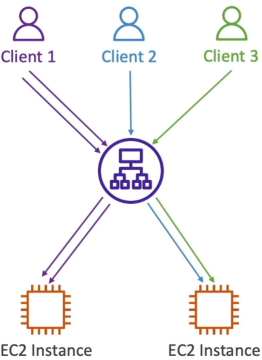
By default, an ALB used a round-robin routing algorithm to distribute traffic evenly. However, if your app stores a user's login session or shopping card data locally inside the memory of a specific instance, routing that user's next click to a different instance will completely break their experience and log them out.
Key Takeaways
The Core Mechanical Shift
- Default Behavior: Without Stickiness, the ALB distributes incoming HTTP requests across all healthy targets (like a round-robin rotation).
- Sticky Behaviour: Once activated, the ALB forces a specific browser client to stay locked to the exact same backend EC2 instance for all subsequent requests, bypassing the default traffic distribution.
Deep Dive: Cookie Classifications
Two distinct ways the stickiness cookie can be managed:
- Load Balancer-Generated Cookies (Duration-Based):
- The ALB handles 100% of the heavy lifting
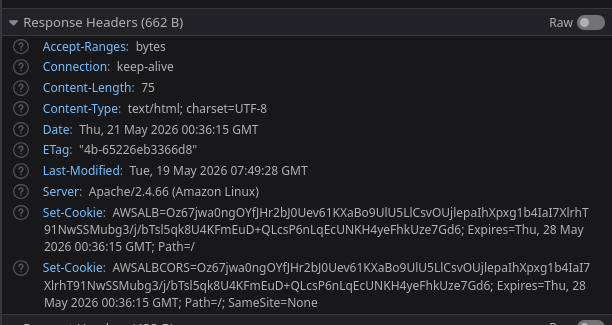
- It injects its own tracking cookie named
AWSALB - You define a rigid lifespan constraint directly in the console, ranging from 1 second up to 7 days (defaults to 1 day)
- Application-Based Cookies:
- Custom Cookie: Your actual backend target application code creates the cookie. You tell the TG the exact name of your app's custom session cookie (e.g.,
MyStoreSessionID). - Reserved Names Warning: You must not name your custom app cookie
AWSALBorAWSALBAPPorAWSALBTGbecause those are strictly locked and reserved by the Elastic Load Balancing service itself.
- Custom Cookie: Your actual backend target application code creates the cookie. You tell the TG the exact name of your app's custom session cookie (e.g.,
- ALB Mirror Cookie: When you use an app-driven cookie, the load balancer reads it and injects its own companion cookie named
AWSALBAPPto mirror the state and route the client appropriately.
Real-Time Verification (The Browser Test)
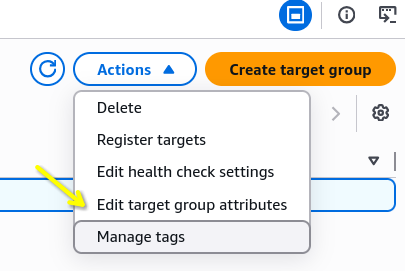
- The Activation Step: Target group (TG) stickiness is configured exclusively under Target groups dashboard > Action > Edit target group attributes
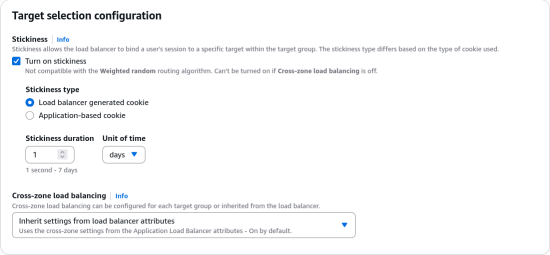
- The Network Proof: When stickiness is toggled on, refreshing the page locks the user onto one single instance ID
- The headers: Inspecting the browser's developer tools under the Network tab reveals:
- The ALB sends a
Set-Cookieresponse header down to the browser with the expiration timestamp. - On every subsequent request, the browser wraps that cookie inside its
Request Cookiesmetadata header and fires it back up to the ALB.
- The ALB sends a
Exam Tips
-
The Cookie Name Gotcha: If an exam question presents a snippet of application code or an architectural configuration where a developer is attempting to set up custom application based stickiness, but the ALB keeps throwing errors or ignoring the session, check the cookie name. If they named their code's cookie
AWSALB, it will fail because that namespace is explicitly reserved by AWS. -
The Operational Risk: Always remember about Imbalanced Load. If you have an instance that gets paired with a "heavy user" or high-volume client API script, that single backend server can quickly spike to 100% CPU utilization while your other instances sit completely idle.