Network Load Balancer (NLB)
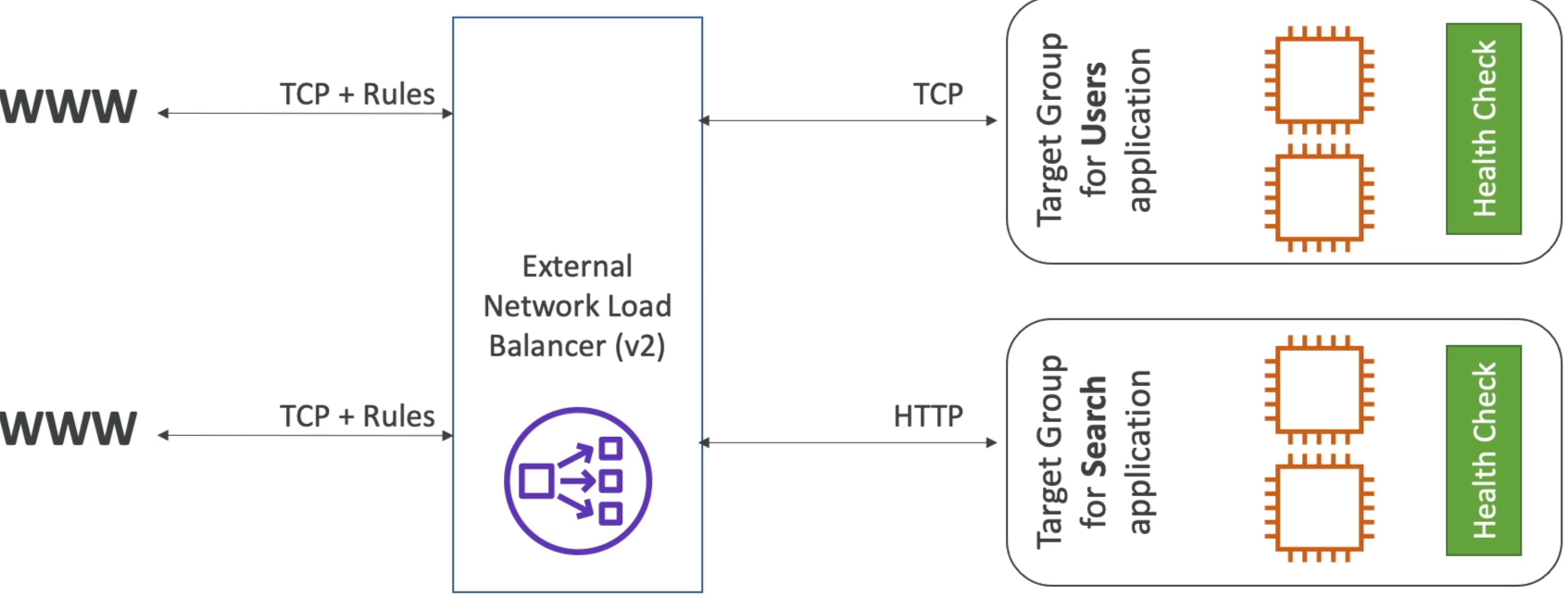
NLB operates at Layer 4 (Transport Layer) and us designed for ultimate performance and ultra-low latency. If the ALB is the "smart" load balancer, the NLB is the "blazing fast" speed machine.
Key Takeaways
Layer 4 Operation & Extreme Performance
- Protocol Focus: The NLB operates exclusively at the transport layer, handling raw TCP and UDP traffic. It doesn't look at HTTP headers, cookies, or URL paths.
- Massive Throughput: It is built for raw speed, capable of scaling to handle millions of requests per second automatically while maintaining ultra-low, sub-millisecond latency.
Static and Elastic IP Support
- The Network Identity: Unlike an ALB (which uses dynamic IP addresses that constantly change under its DNS record), an NLB allocates exactly one static IP address per AZ.
- Whitelisting Advantage: You can manually assign a permanent Elastic IP (EIP) to each AZ target for the NLB. This allows downstream clients or corporate firewalls to easily whitelist a fixed set of IP addresses to communicate with your application safely.
Target Group Options & Chaining
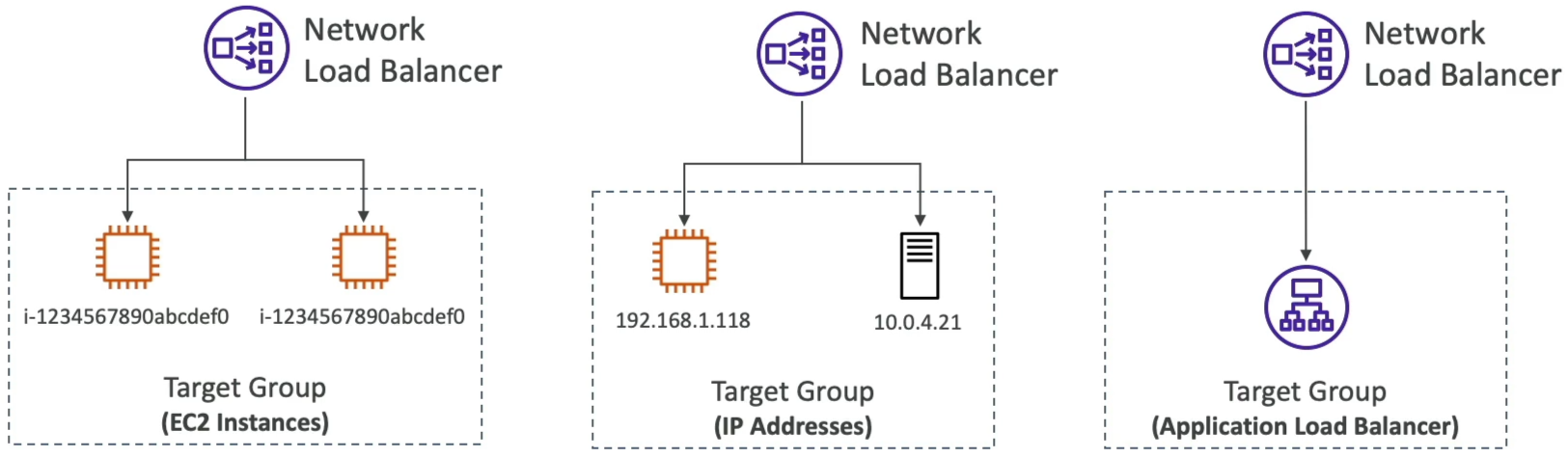
An NLB target group can point to three distinct types of backends:
- EC2 Instances: Routing raw TCP/UDP streams directly to a fleet of compute servers/
- Private IP Addresses: Hardcoded private IPs. These can target internal VPC resources or connect over a VPN/Direct Connect to route traffic straight to on-premises physical servers in your own data center.
- ALB Chaining (NLB in front of ALB): You can place an NLB directly in front of an ALB. This hybrid layout gives your architecture the absolute best of both worlds: the fixed, whitelisted static IPs of the NLB combined with the complex, layer 7 path-based routing rules of the ALB.
Flexible Health Checking
- Even though the NLB routes the Layer 4 transport packets, its target groups are smart enough to assess application-level health.
- The NLB supports three protocols for its health check pings: TCP, HTTP, and HTTPS. If your backend server runs a web stack, the NLB can ping an HTTP route to verify stability.
Exam Tips
-
The Static IP Clue: If an exam scenario says, "A third-party corporate partner needs to access your backend API, but their security team requires a set of fixed, immutable IP addresses to whitelist in their firewall rules", the ALB is an immediate wrong answer. You must deploy a Network Load Balancer (NLB) and assign Elastic IPs to it.
-
The High Throughput/Non-HTTP Clue: Watch out for keywords like "millions of request per second", "ultra-low latency", "gaming server backends (UDP), "IoT data ingestion streams". or "streaming raw TCP connections". These are immediate, explicit tells to pick NLB.
Practice Test
Question 1: You are running a public DNS service on an EC2 instance where the DNS name is pointing to the IP address of the instance. You wish to upgrade your DNS service but would like to do it without any downtime.
Which of the following options will help you accomplish this?
- Provide a static private IP
- Create a Load Balancer and an auto scaling group
- Use Route 53
- Elastic IP
Correct Answer
- Provide a static private IP
- Explanation: Private IP addresses are not publicly routable over the internet, so users outside your VPC would not be able to reach your public DNS service.
- Create a Load Balancer and an auto scaling group
- Explanation: AWS Elastic Load Balancers expose a DNS domain name rather than a static public IP address. Since DNS clients query specific public IP addresses, an ALB does not fit this requirement.
- Use Route 53
- Explanation: Amazon Route 53 is AWS's managed DNS service. However, the scenario specifically asks about upgrading a custom DNS software service running directly on an EC2 instance, not migrating to Route 53.
- Elastic IP
- Explanation: An Elastic IP (EIP) address is a static, publicly routable IPv4 address designed for dynamic cloud computing. You can associate an Elastic IP with a new EC2 instance running the upgraded DNS software, instantly remapping the public IP from the old instance to the new instance with zero downtime for clients querying that IP.