Amazon Aurora Hands-On
The lab demonstrates the creation of a highly available, multi-node Amazon Aurora MySQL-Compatible regional cluster. By provisioning a single Writer (Master) node alongside a dedicated Reader node in a separate AZ, Stephane shows how Aurora builds a highly resilient routing environment using abstraction connection endpoints while exposing native features like Read Replica Auto Scaling and Global Database expansions.
Key Takeaways
Key Architecture: Cluster Topology & Advanced Provisions
When you deploy Aurora via the console, you are configuring a Cluster rather than a single database box:
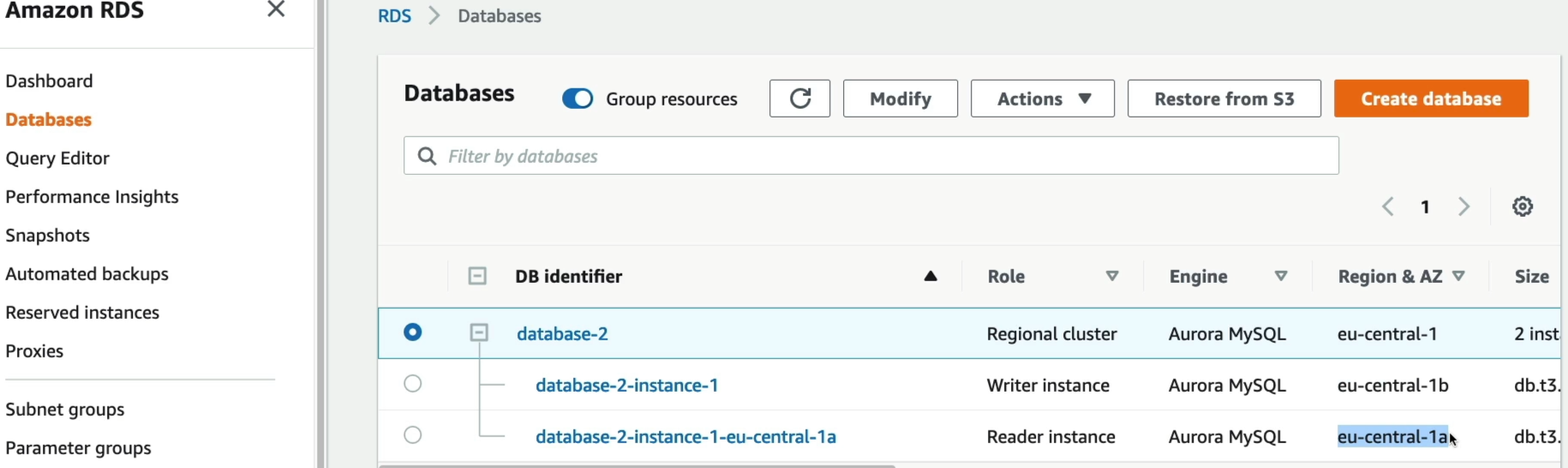
- Topology Definition: Under the Production template, the engine automatically spins up a multi-node infrastructure. Ther primary compute node is designed as the Writer Instance (handling core transaction changes), and the secondary compute node is designed as the Reader Instance located in an isolated AZ to guarantee automatic failover protection.
- Storage Tiers: You face a choice between Aurora Standard (cost-effective for unpredictable or low-I/o app workloads) and Aurora I/O-Optimized (ideal for hyper-intense read/write applications requiring predictable flat-rate pricing for disk operations).
- Serverless Scaling Choice (v2): If you select the serverless option, you stop provisioning raw instance sizing hardware (e.g.,
db.t3.medium). Instead, you select a min and max ceiling of Aurora Capacity Units (ACUs), allowing the engine to upscale or downscale instantly on demand.
The Live Cluster Connection Map
Once the cluster provisions, the AWS console displays the definitive routing architecture you need to know inside out for your application configuration strings:
- Local Write Forwarding Capability: You can toggle this feature in the settings. If your application code accidentally throws an
INSERTorUPDATEstatement at the Reader Endpoint, Aurora doesn't crash or return a read-only error. Instead, the replica node accepts the write data payload and silently forwards it internally to the Writer instance for execution, dramatically simplifying you application code logic.
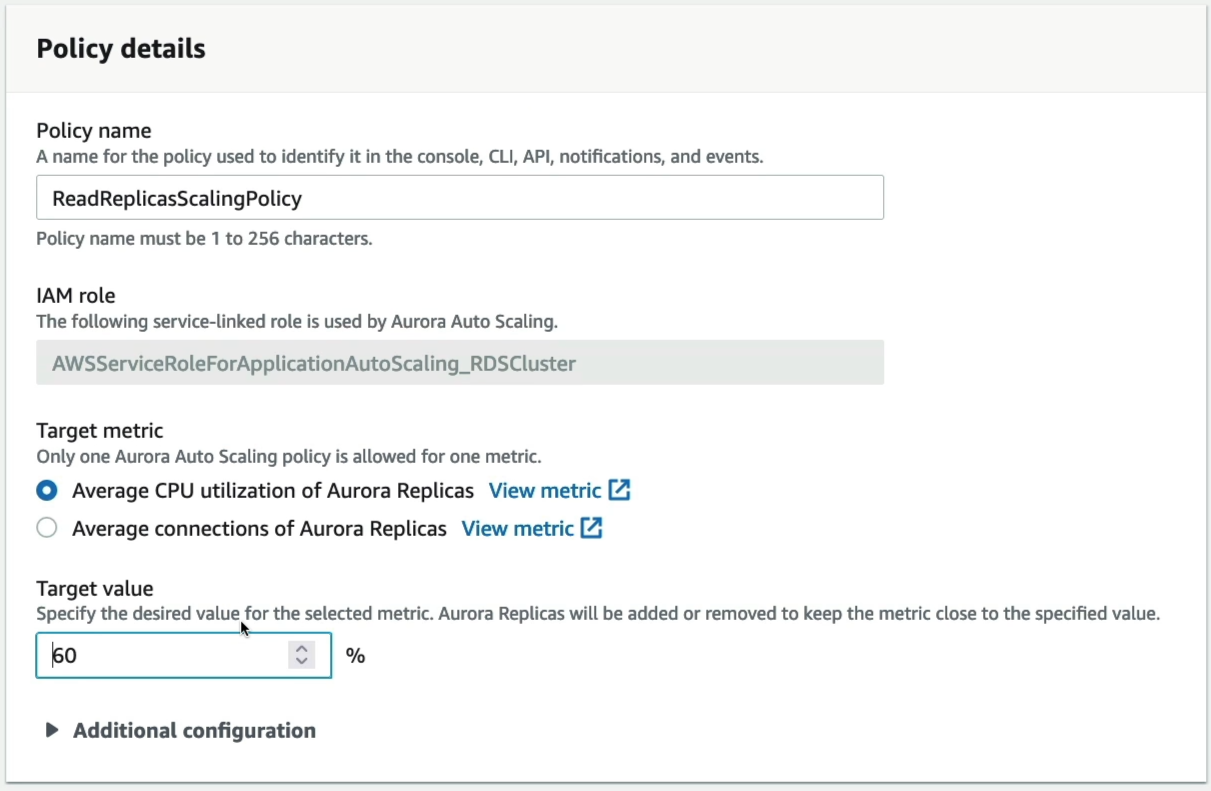
- Read Replica Auto Scaling: He shows the automated engine configuration page where you can set a target metric limit (e.g., "Keep average replica CPU at 60%"). If traffic jumps, the ASG layer behind Aurora automatically spins up new read nodes (up to a max 15), and the Reader Endpoint instantly adds them to its DNS load balancing rotation.
The Native Cluster Tear-Down Process
When you delete an Aurora cluster, you have the option to create a final snapshot backup before the entire cluster infrastructure is deprovisioned. This snapshot is stored in S3 and can be used to restore a new cluster with the exact same data state at a later time. If you choose not to create a final snapshot, the cluster and all its data are permanently deleted without any recovery option.
[Active Cluster] ──> (Attempt Cluster Delete: BLOCKED) ──> [Step 1: Delete Reader Node]
                                                                        │
[Cluster Vanishes] <── [Step 3: Cluster Container Self-Deletes] <── [Step 2: Delete Writer Node]
You cannot simply hit delete on the parent cluster instance. To successfully wipe the cluster and avoid zombie run-rate charges, you must enter each instance child leaf manually, initiate individual Delete commands, type the confirmation delete me in the pop-up, clears our the reader first, and then wipe the master writer node.
Exam Tips
- The Read-After-Write Consistency Dilemma: If an exam scenario says, "You enabled Local Write Forwarding on your Aurora MySQL cluster so your application can send all traffic to a single endpoint. However, during heavy traffic bursts, users complain that right after they update their user profile, the page refreshes and still shows their old information", you are dealing with a session consistency configuration choice. The Fix is to adjust the database parameter
aurora_replica_read_consistencyinside your session fromEVENTUALup toSESSION. This forces the reader instance to wait until the forward write has fully synchronized across the shared disk before responding to that specific user's read query.