ElastiCache Hands-On
The lab demonstrates the full creation, infrastructure configuration, and cleanup lifecycle of a node-based ElastiCache for Redis database cluster. By disabling multi-shard cluster modes to run a cost-effective single-node instance inside a dedicated subnet group, Stephane maps out the security parameters (like Redis AUTH vs ACLs) and operational metrics used to construct highly responsive, isolated cloud caching systems.
Key Takeaways
Key Architecture: Core Console Configurations
During the creation phase, ElastiCache forces you to make critical architectural design decisions:
- The Engine: The console list Redis OSS, Memcached, and Valkey. Valkey is the community-driven, fully open-source fork created after Redis changed its licensing model. AWS actively recommends Valkey because it delivers identical drop-in functionality but is priced significantly lower than traditional Redis engines.
- The Cluster Topology Mode:
- Cluster Mode Disabled: Creates a single master primary shard that handles writes, attached to up to 5 read replicas. This is the baseline setup for a single-node cluster.
- Cluster Mode Enabled: Utilizes Sharding to partition your keyspace across multiple distinct master nodes simultaneously, allowing your cache to scale past the memory limitation of a single physical server host.
- Subnet Group Isolations: Just like an RDS database, an ElastiCache node cannot drift loosely in a VPC. You must map a custom Cache Subnet Group linking specific backend subnets to tell AWS exactly which isolated AZs are permitted to host the caching machines.
The Security & Authentication Layers
Stephane highlights that turning on data-in-transit protection alters how your backend applications must connect to the cluster endpoints:
| Security State | Encryption Type | Authentication Engine Access |
|---|---|---|
| Transit Disabled | Open network packet streaming. | Standard anonymous endpoint handshakes. Controlled purely by VPC Security Groups. |
| Transit Enabled | Strict TLS/SSL tunnel wrapping. | Unlocks the choice between Redis AUTH (requiring a static, hardcoded access token string) or modern Role-Based Access Control Lists (ACLs) to manage multi-user permissions. |
Application Connectivity & Clean Wiping
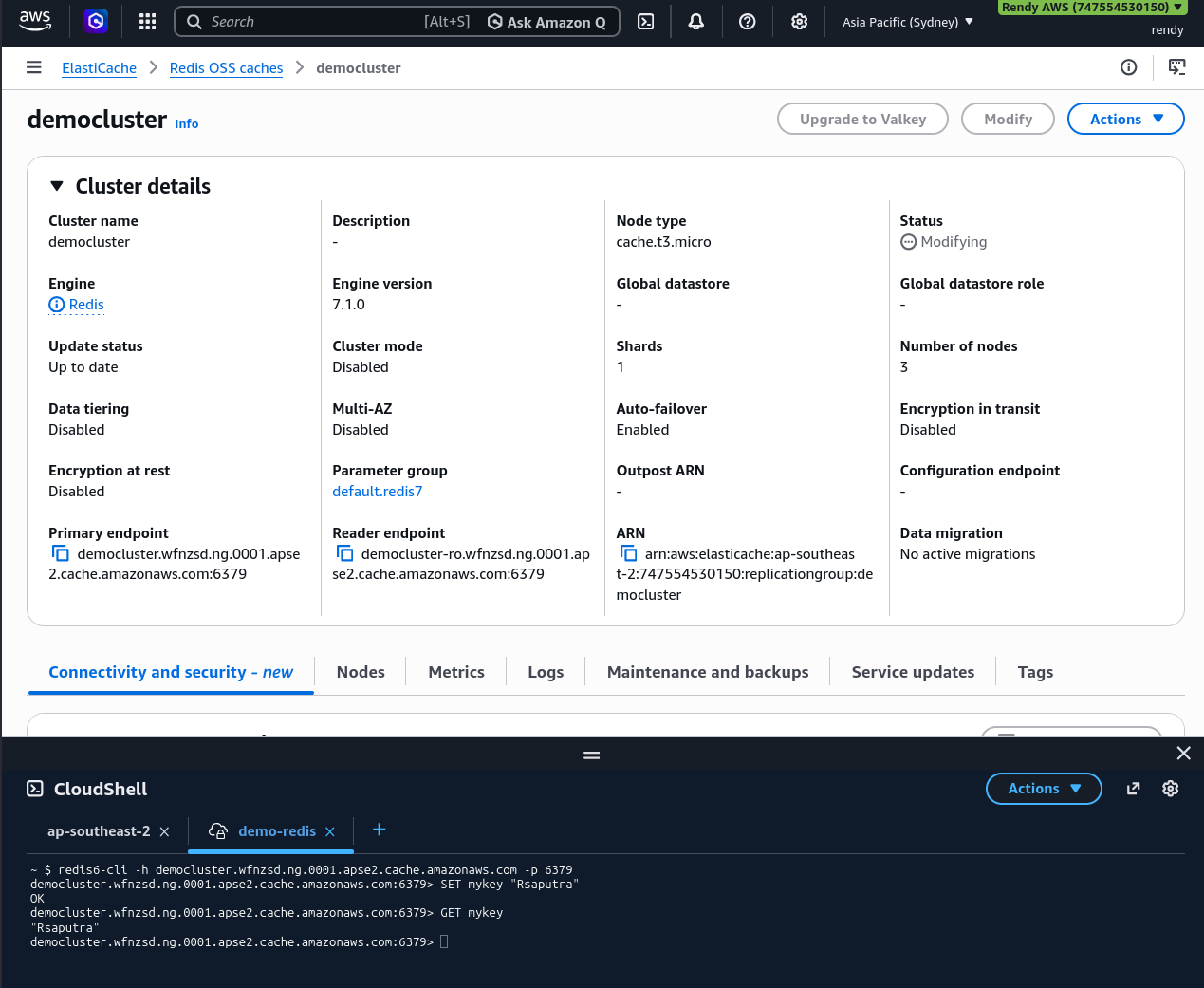
Once the infrastructure status flips to Available, the console generates the unique endpoint strings you feed into your backend code blocks:
[Cache Shard Primary Node] ──> Provides: Primary Endpoint (Handles App Reads & Writes)
[Cache Shard Replica Node] ──> Provides: Reader Endpoint  (Handles Offloaded App Reads Only)
Because ElastiCache is a high-performance database cluster, the teardown sequence requires explicit commands. Unlike RDS, there is no deletion protection toggle block. You choose the cluster node, trigger Delete, uncheck the automation backup string option, type the cluster name to confirm you understand that volatile RAM contents are about to vanish, and execute the wipe.
Exam Tips
The Connection Timed Out: If an exam scenario says, "A developer is trying to run a test script from an EC2 instance to seed data into a newly created ElastiCache cluster, but the scripts hangs indefinitely and returns a connection timeout error", look past the engine code. Because ElastiCache behaves exactly like RDS from a network footprint perspective, a timeout means the cluster's VPC SG is actively blocking inbound traffic from the EC2's instance security group on Port 6379 (redis) or Port 11211 (memcached).
The Cache Data Security Mandate: If a question demands a caching setup that encrypts all customer payloads travelling across the internal cloud network while ensuring that distinct application services have isolated, granular read/write access privileges within the data store, the architecture play is to enable in Transit Encryption and deploy ElastiCache User Groups/Redis Access Control Lists (ACLs) to manage the identities.