Amazon RDS Overview
Amazon Relational Database Service (RDS) is a fully managed, relational database service that uses SQL as its query language. Instead of manually installing a database engine on an EC2 instance, patching the OS, and scripting backups, RDS automates the entire infrastructure lifecycle. Because it is a managed service, AWS blocks all SSH access to the underlying server, so we can only interact with the database via client applications.
Key Takeaways
Supported Database Engines Matrix
You need to commit the six standard relational engines (plus AWS's cloud-native premium tier) to memory, as the exam will cross-reference them:
- Open Source: MySQL, PostgreSQL, MariaDB
- Commercial License: Oracle, Microsoft SQL Server, IBM DB2
- AWS Proprietary: Amazon Aurora (highly testable, has its own rule)
The Management Trade-Off: EC2 vs. RDS
| Task / Feature | Self-Managed on EC2 | Fully Managed Amazon RDS |
|---|---|---|
| OS Patching & Provisioning | ❌ Manual (You handle security updates) | Automated (Handled in designated maintenance windows) |
| Backups & Disaster Recovery | ❌ Manual scripts to S3 snapshots | Automated Continuous Backups + Point-in-Time Recovery |
| Scaling Architecture | ❌ Complex clustering setups | Horizontal (Read Replicas) & Vertical (Instance Resizing) |
| Host Operating System Access | Full SSH Access | ❌ No SSH Allowed (Strictly forbidden by the service layer) |
Under the Hood: RDS Storage Auto-Scaling
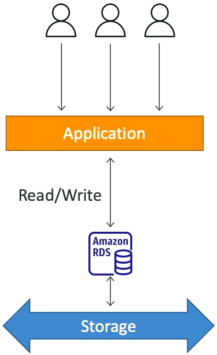
This is an elegant feature designed to prevent your database from locking up due to a full disk (DiskFull status). RDS storage is backed by Amazon EBS, and with Auto-Scaling enabled, it will dynamically increase your volume size on the fly without causing a single second of production downtime.
The 3-Part Trigger Blueprint: For RDS to rigger an automatic storage scale-up, the volume must breach three specific structural threshold simultaneously:
- The Capacity Gate: Available free storage drops to less than 10% of the currently allocated volume size.
- The Duration Gate: This low storage condition must persist for at least 5 minutes.
- The Cooldown Gate: At least 6 hours must have passed since the last storage modification action (to prevent rapid back-to-back volume extensions).
To prevent your storage costs from running wild under this auto-scaling mechanism, you must configure a Maximum Storage Threshold ceiling when turning this on.
Exam Tips
The exam loves to challenge your understanding of the service boundaries and storage features.
- The "Locked Box" Scenario: If an exam question asks, "A developer needs to tweak a low-level Linux kernel parameter or install a custom monitoring daemon directly inside the operating system hosting a MySQL database", using standard Amazon RDS is completely wrong. Because RDS strictly denies SSH/root OS access, the developer must either migrate to hosting the database manually on EC2, or look at a specialized hybrid tier called RDS custom (available for Oracle and SQL server).
- The Flash-Sale Database Freeze: If a question states, "An e-commerce application is heading into a viral flash-sale event. The application team expects a massive influx of transaction logs that could fill the database disk within an hour, risking an application crash due to storage exhaustion", the best practice solution is to Enable RDS Storage Auto-Scaling and set an ample Maximum Storage Threshold. This guarantees zero operational overhead or downtime while the storage expands dynamically behind the scenes.